
Toyota Sienna 2010-2026 Owners Manual: Locking and unlocking the back door
Entry function (vehicles with a smart key system)
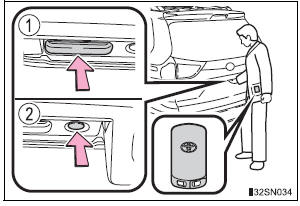
Carry the electronic key to enable this function.
- Press the unlock button to
unlock all the doors.
The door cannot be unlocked for 3 seconds after the door is locked.
Lock the back door again when you leave the vehicle. The back door will not lock automatically after it has been opened and then closed.
- Press the lock button to lock all the doors.
Check that the door is securely locked.
Wireless remote control
Door lock switch
 Back door
The back door can be locked/unlocked and opened/closed by
the following procedures. ...
 Opening/closing the back door from inside the vehicle (vehicles
with power back door)
Opening/closing the back door from inside the vehicle (vehicles
with power back door)
Press and hold the switch to open/
close the back door.
Pressing the switch again while the
power back door is operating will
cause the operation to reverse.
However, the reverse operation
...
Other materials:
Display
When the sensors detect an obstacle, the following displays inform
the driver of the position and distance to the obstacle.
Multi-information display
Front corner sensor operation
Rear corner sensor operation
Rear center sensor operation
Audio system screen
Intuitive parking ...
Rear Power Seat Switch Circuit
DESCRIPTION
When the power rear no. 2 seat switch is operated, a recline signal is sent
to the fold seat control ECU.
The ECU activates the reclining motor based on the signal from the power rear
no. 2 seat switch.
WIRING DIAGRAM
INSPECTION PROCEDURE
1 INSPECT FOLD SEAT CONTROL ECU
...
Problem symptoms table
Proceed to the reference page shown in the table below for
each malfunction symptom and troubleshoot each circuit.
HINT:
Troubleshooting of the theft deterrent system is based on the
premise that the door lock control system and the wireless
door lock control system are operating normally. Ac ...
