
Toyota Sienna Service Manual: AVC-LAN Circuit
DESCRIPTION
Each unit of the audio system connected to the AVC-LAN (communication bus) transfers the signal of each switch by communication.
When a short to +B or short to ground occurs in this AVC-LAN, the audio system will not function normally as the communication is discontinued.
INSPECTION PROCEDURE
1 INSPECT RADIO RECEIVER
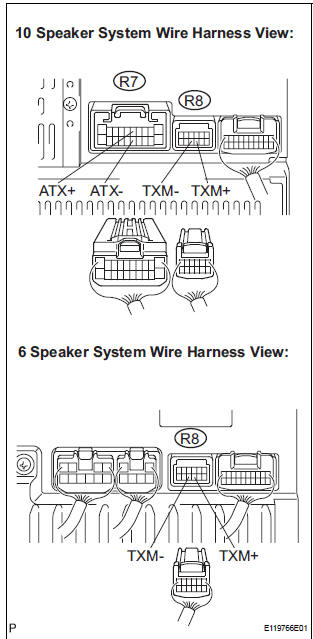
- Disconnect the radio receiver connectors.
- Measure the resistance according to the value(s) in the table below.
Standard resistance
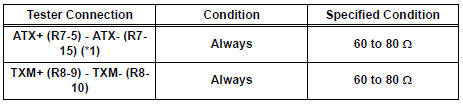
*1: 10 Speaker System
2 CHECK HARNESS AND CONNECTOR
HINT: For details of the connectors, refer to the "TERMINALS OF ECU"
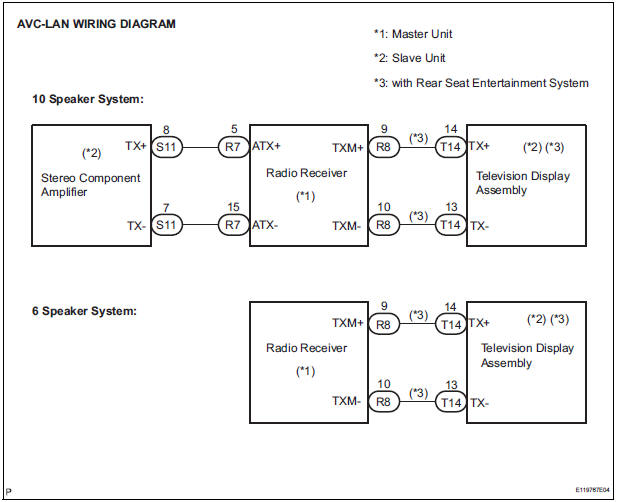
- Referring to the AVC-LAN wiring diagram below, check all AVC-LAN circuits.
- Disconnect all connectors in all AVC-LAN circuits.
- Check for an open or short in all AVC-LAN circuits.
OK: There is no open or short circuit
PROCEED TO NEXT CIRCUIT INSPECTION SHOWN IN PROBLEM SYMPTOMS TABLE
 Mute Signal Circuit between Radio Receiver and Television Display
Assembly
Mute Signal Circuit between Radio Receiver and Television Display
Assembly
DESCRIPTION
The radio receiver controls the volume according to the MUTE signal from the
television display
assembly.
The MUTE signal is sent to reduce noise and a popping sound generated when ...
 Vehicle Speed Signal Circuit between Multi-display and Combination
Meter
Vehicle Speed Signal Circuit between Multi-display and Combination
Meter
DESCRIPTION
This circuit is necessary for the ASL (Auto Sound Leveliser) built into the
radio receiver.
Speed signals are received from the combination meter and used for the ASL.
The ASL fun ...
Other materials:
Inspection
1. INSPECT STEERING PAD SWITCH LH (w/o
Navigation System)
Measure the resistance according to the values in
the table below.
Standard resistan
If the result is not as specified, replace the steering
pad switch LH.
2. INSPECT STEERING PAD SWITCH RH (w/ Navigation
System)
...
Uniform Tire Quality Grading
This information has been prepared in accordance with regulations
issued by the National Highway Traffic Safety Administration of the
U.S. Department of Transportation.
It provides the purchasers and/or prospective purchasers of Toyota
vehicles with information on uniform tire quality grading. ...
Removal
1. DISCONNECT CABLE FROM NEGATIVE BATTERY
TERMINAL
CAUTION:
Wait for 90 seconds after disconnecting the cable to prevent the airbag working
2. REMOVE FRONT SEAT ASSEMBLY
HINT:
Refer to the instructions for removal of the front seat assembly (for
flat type).
Refer to the ins ...
