
Toyota Sienna 2010-2026 Owners Manual: Checking tires
Check if the treadwear indicators are showing on the tires. Also check the tires for uneven wear, such as excessive wear on one side of the tread. Check the spare tire condition and pressure if not rotated.
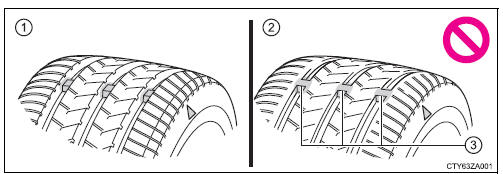
- New tread
- Worn tread
- Treadwear indicator
The location of treadwear indicators is shown by a “TWI� or “
 � marks,
etc., molded into the sidewall of each tire.
Replace the tires if the treadwear indicators are showing on a tire.
 Tires
Tires
Replace or rotate tires in accordance with maintenance schedules
and treadwear. ...
 Tire rotation
Rotate the tires in the order
shown.
To equalize tire wear and extend
tire life, Toyota recommends that
tire rotation is carried out at the
same interval as tire inspection. ...
Other materials:
If a warning light turns on
or a warning buzzer
sounds
Calmly perform the following actions if any of the warning lights
comes on or flashes. If a light comes on or flashes, but then
goes off, this does not necessarily indicate a malfunction in the
system. However, if this continues to occur, have the vehicle
inspected by your Toyota dealer.
Warnin ...
Short to GND in Driver Side Squib Circuit
DTC B0102/11 Short to GND in Driver Side Squib Circuit
DESCRIPTION
The driver side squib circuit consists of the center airbag sensor assembly,
the spiral cable and the
steering pad.
The circuit instructs the SRS to deploy when deployment conditions are met.
DTC B0102/11 is recorded when ...
Operation check
1. DETECTION RANGE MEASUREMENT AND INDICATOR CHECK
Turn the IG switch ON.
Move the shift lever to the R position (when the back
sonar and rear clearance sonar is checked).
With front clearance sonar:
Move the shift lever to the N position (when the front
clearance son ...
