
Toyota Sienna Service Manual: Compressor Lock Sensor Circuit
DTC B1422/22 Compressor Lock Sensor Circuit
SYSTEM DESCRIPTION
The ECM sends an engine speed signal to the A/C amplifier via CAN communication and BEAN communication.
The A/C amplifier reads the difference between compressor speed and engine
speed. When the
difference becomes too large, the A/C amplifier determines that the compressor
locks, and turns the
magnetic clutch off.
WIRING DIAGRAM
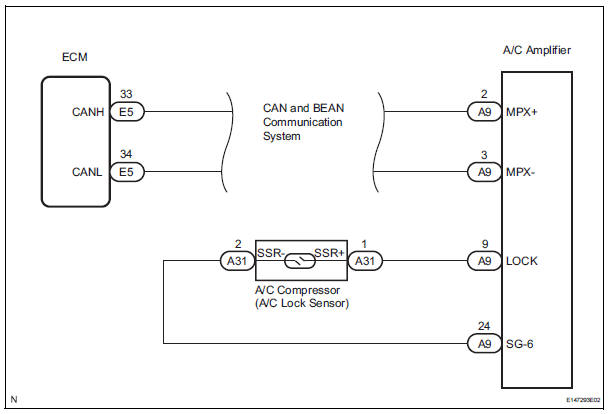
INSPECTION PROCEDURE
1 CHECK CAN COMMUNICATION SYSTEM
(a) Use the intelligent tester to check if the CAN communication system is functioning normally.
Result 


2 CHECK MULTIPLEX COMMUNICATION SYSTEM
(a) Use the intelligent tester to check if the multiplex communication system (BEAN) is functioning normally.
Result 


3 INSPECT A/C AMPLIFIER
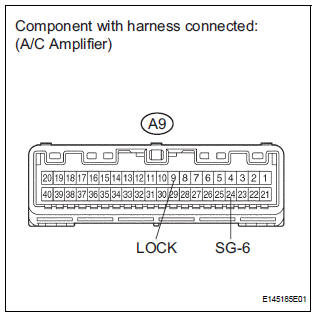
(a) Remove the A/C amplifier with the connectors still connected.
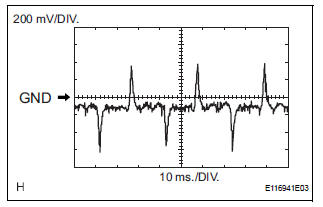
(b) Measure the waveform of the connector.
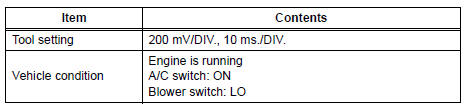
Standard 
Result 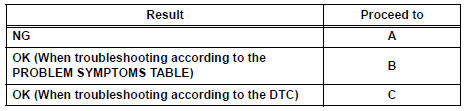

4 INSPECT COMPRESSOR AND MAGNETIC CLUTCH (A/C LOCK SENSOR)
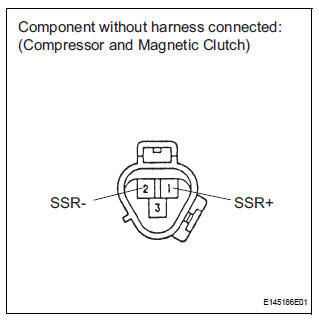
(a) Disconnect the connector from the A/C compressor.
(b) Measure the resistance according to the value(s) in the table below.
Standard resistance 


5 CHECK HARNESS AND CONNECTOR (A/C AMPLIFIER - A/C LOCK SENSOR)
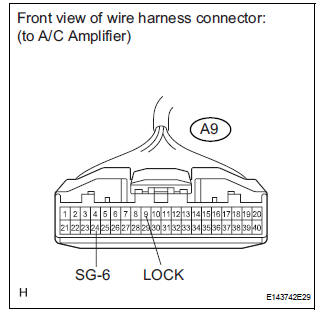
(a) Disconnect the connector from the A/C amplifier.
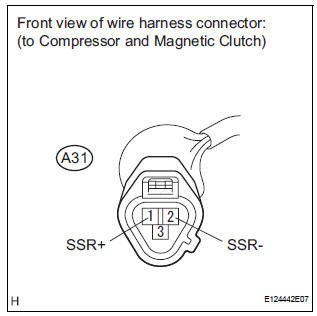
(b) Measure the resistance according to the value(s) in the table below.
Standard resistance 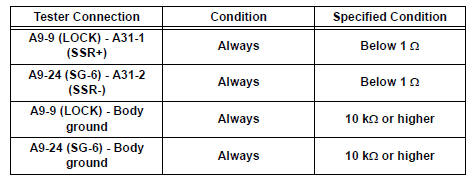


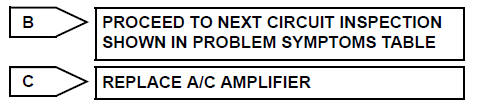
REPLACE A/C AMPLIFIER
 Solar Sensor Circuit (Passenger Side)
DTC B1421/21 Solar Sensor Circuit (Passenger Side)
DESCRIPTION
The solar sensor, which is installed on the upper side of the instrument
panel, detects sunlight and
controls the air conditioni ...
 Pressure Sensor Circuit
DTC B1423/23 Pressure Sensor Circuit
DESCRIPTION
This DTC is output when refrigerant pressure on the high pressure side is
extremely low (0.19 MPa (2.0
kgf/cm2, 28 psi) or less) or extremely high ...
Other materials:
DTC check / clear
NOTICE:
All the stored DTCs and freeze frame data are erased if:
the ECM is changed from normal mode to check mode
or vice versa; or 2) the ignition switch is turned from ON
to ACC or off while in check mode.
Before changing modes, always check and make a note
of any DTCs and fr ...
Engine hood courtesy
switch
Inspection
1. INSPECT ENGINE HOOD COURTESY SWITCH
Measure the resistance according to the value(s) in
the table below.
Standard resistance
If the result is not as specified, replace the hood lock
assembly. ...
Abnormal Temperature Inside ID1 Tire
DESCRIPTION
Each tire pressure warning valve and transmitter measures the internal
temperature of its tire as well as
tire pressure, and transmits the information to the tire pressure warning ECU
along with the transmitter ID.
If the measured temperature is out of the specified range, t ...
