
Toyota Sienna Service Manual: Data list / active test
1. DATA LIST
Using the intelligent tester to read the Data List allows the values or states of switches, sensors, actuators and other items to be read without removing any parts. This non-intrusive inspection can be very useful because intermittent conditions or signals may be discovered before parts or wiring is disturbed. Reading the Data List information early in troubleshooting is one way to save diagnostic time.
- Warm up the engine.
- Turn the ignition switch off.
- Connect the intelligent tester to the DLC3.
- Turn the ignition switch to the ON position.
- Turn the tester ON.
- Enter following menus: DIAGNOSIS / OBD/MOBD / METER / DATA LIST.
METER:
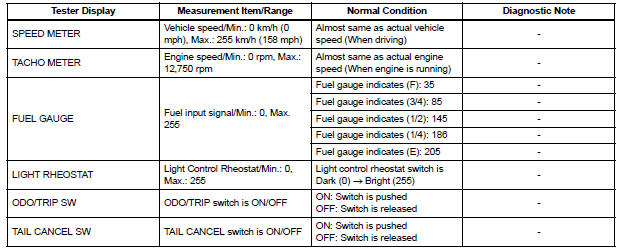
ABS/TRAC/VSC:

ENGINE:

2. ACTIVE TEST
Using the intelligent tester to perform Active Tests allows relays, VSVs, actuators and other items to be operated without removing any parts. This non-intrusive functional inspection can be very useful because intermittent operation may be discovered before parts or wiring is disturbed. Performing Active Tests early in troubleshooting is one way to save diagnostic time.
Data List information can be displayed while performing Active Tests.
- Connect the intelligent tester to the DLC3.
- Turn the ignition switch to the ON position.
- Turn the tester ON.
- Enter following menus: DIAGNOSIS / OBD/MOBD / METER / ACTIVE TEST
METER:
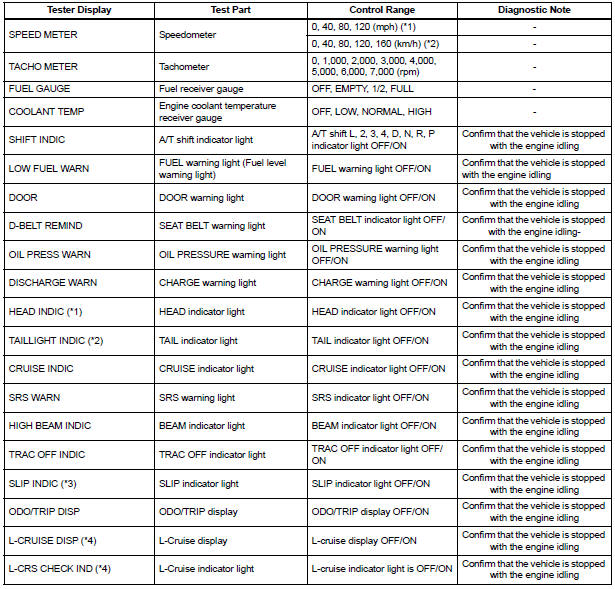

MAIN BODY:

*1: for U.S.A.
*2: Except for U.S.A.
*3: with VSC
*4: with Dynamic Laser Cruise Control System
*5: for Optitron Meter
 Diagnosis system
1. CHECK DLC3
The ECU uses the ISO 15765-4 for communication
protocol. The terminal arrangement of the DLC3
complies with SAE J1962 and matches the ISO
15765-4 format.
NOTICE:
...
 On-vehicle inspection
1. INSPECT SPEEDOMETER
Check the operation.
Using a speedometer tester, check the
speedometer indication according to the table
below.
Reference: mph (U.S.A.)
Referen ...
Other materials:
On-vehicle inspection
1. INSPECT COOLER CONDENSER CORE
(a) If the fin of the cooler condenser core is dirty, clean
it with water and dry it with compressed air.
NOTICE:
Do not damage the fin of the cooler condenser
core.
(b) If the fin of the cooler condenser core is bent, make
it straight using a screwdriver or p ...
Front door lock
INSPECTION
1. INSPECT FRONT DOOR W/ MOTOR LOCK ASSEMBLY LH
Apply battery voltage to the door lock and check
operation of the motor.
OK
HINT:
If the result is not as specified, replace the door lock
assembly.
Measure the resistance according to the value(s) in
the table ...
For vehicles equipped with traction control (trac) system
When using a 2-wheel drum tester such as a
speedometer tester or chassis dynamometer, etc., or
jacking up the front wheels and driving the wheels,
always push in the TRAC cut ("TRAC OFF") switch and
turn the TRAC system OFF.
FOR VEHICLES EQUIPPED WITH TRACTION CONTROL (TRAC) SYS ...
