
Toyota Sienna Service Manual: Disassembly
1. INSPECT OIL PUMP ASSEMBLY
HINT: (See page AX-234)
2. REMOVE CLUTCH DRUM OIL SEAL RING

(a) Remove the 2 clutch drum oil seal rings.
3. REMOVE STATOR SHAFT ASSEMBLY
(a) Using a "torx" socket (T30), remove the 11 bolts and stator shaft.
4. INSPECT CLEARANCE OF OIL PUMP ASSEMBLY
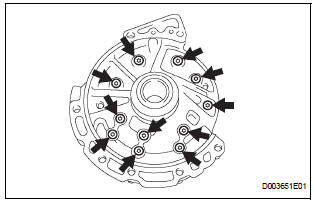
HINT: (See page AX-234)
5. REMOVE FRONT OIL PUMP DRIVE GEAR

(a) Remove the front oil pump drive gear.
6. REMOVE FRONT OIL PUMP DRIVEN GEAR
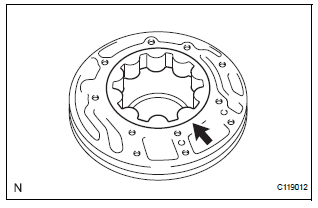
(a) Remove the front oil pump driven gear.
7. REMOVE FRONT OIL PUMP BODY O-RING
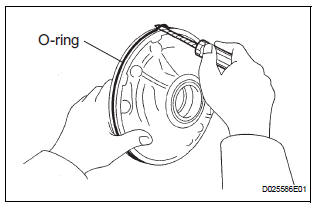
(a) Using a screwdriver, remove the O-ring.
HINT: Tape the screwdriver before use.
8. REMOVE FRONT OIL PUMP OIL SEAL
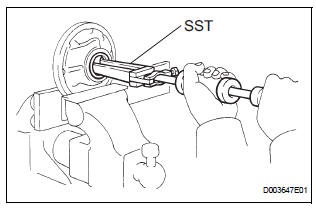
(a) Mount the oil pump in a soft jaw vise.
(b) Using SST, remove the oil seal from the oil pump body.
SST 09308-00010
 Oil pump
COMPONENTS
...
 Inspection
1. INSPECT OIL PUMP ASSEMBLY
(a) Turn the drive gear with the 2 screwdrivers and
make sure that it rotates smoothly.
NOTICE:
Be careful not to damage the oil seal lip.
2. INSPEC ...
Other materials:
High Temperature
DTC 58-45 High Temperature
DTC 80-45 High Temperature
DESCRIPTION
DTC No.
DTC Detection Condition
Trouble Area
58-45
High map disc player temperature is detected (Over
80C).
Radio and navigation assembly
80-45
High map disc player tem ...
Disassembly
1. REMOVE AIR REFINER ELEMENT
(a) Release the 2 claw fittings and remove the air filter
sub-assembly.
(b) Remove the air refiner element from the air filter
cover plate.
2. REMOVE COOLING UNIT DAMPER SERVO SUBASSEMBLY
(a) Remove the 3 screws and the cooling unit damper
servo sub-a ...
Disposal
HINT:
Use the same procedures for the RH side and LH side.
The procedures listed below are for the LH side.
When scrapping a vehicle equipped with the SRS or
disposing of the front seat side airbag assembly, be sure to
deploy the airbag first in accordance with the proc ...
