
Toyota Sienna Service Manual: Engine front oil seal
COMPONENTS
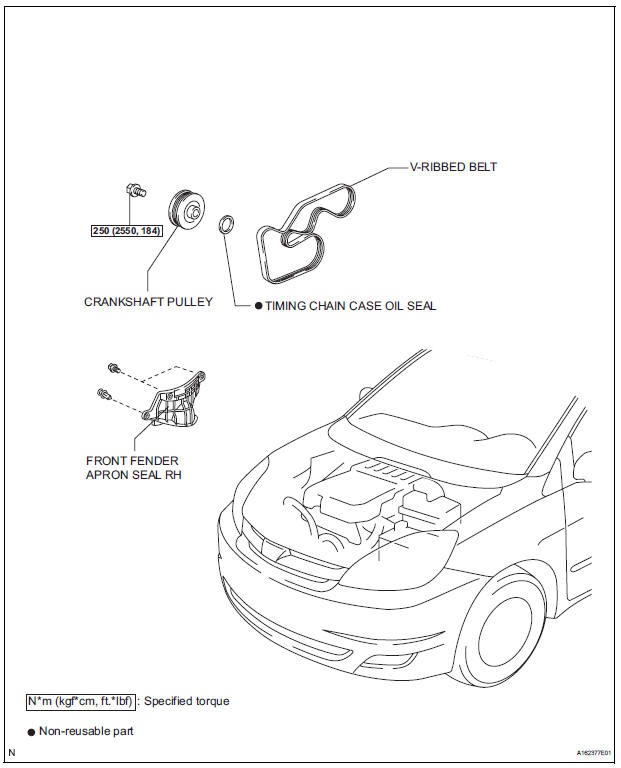
REMOVAL
1. REMOVE FRONT WHEEL RH 2. REMOVE FRONT FENDER APRON SEAL RH (See page EM-26) 3. REMOVE V-RIBBED BELT (See page EM-6) 4. REMOVE CRANKSHAFT PULLEY
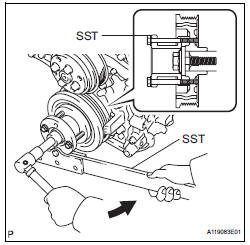
(a) Using SST, loosen the crankshaft pulley bolt.
SST 09213-70011 (09213-70020), 09330-00021
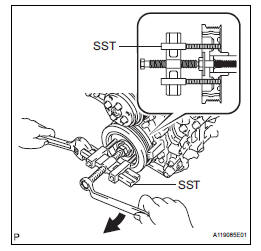
(b) Using SST, remove the crankshaft pulley bolt and crankshaft pulley.
SST 09950-50013 (09951-05010, 09952-05010, 09953-05020, 09954-05021)
5. REMOVE TIMING CHAIN CASE OIL SEAL
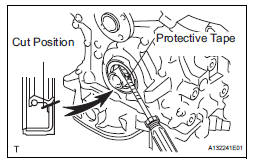
(a) Using a screwdriver, pry out the oil seal.
HINT:
Tape the screwdriver tip before use.
| NOTICE: After the removal, check the crankshaft for damage. If it is damaged, smooth the surface with 400-grit sandpaper. |
INSTALLATION
1. INSTALL TIMING CHAIN CASE OIL SEAL
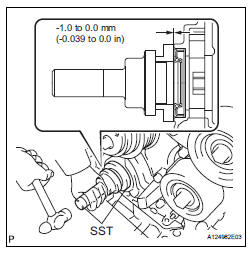
(a) Apply MP grease to a new oil seal lip.
(b) Using SST and a hammer, tap in the oil seal until its surface is flush with the timing chain cover edge.
SST 09223-22010, 09506-35010
NOTICE:
|
2. INSTALL CRANKSHAFT PULLEY
(a) Align the pulley set key with the key groove of the pulley, and slide on the pulley.
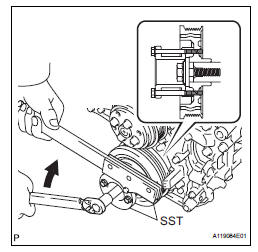
(b) Using SST, install the pulley bolt.
SST 09213-70011 (09213-70020), 09330-00021 Torque: 250 N*m (2550 kgf*cm, 184 ft.*lbf)
3. INSTALL V-RIBBED BELT (See page EM-7) 4. INSTALL FRONT FENDER APRON SEAL RH (See page EM-62) 5. INSTALL FRONT WHEEL RH Torque: 103 N*m (1050 kgf*cm, 76 ft.*lbf)
 Drive belt
COMPONENTS
REMOVAL
1. REMOVE FRONT WHEEL RH
2. REMOVE FRONT FENDER APRON SEAL RH (See
page EM-26)
3. REMOVE V-RIBBED BELT
(a) Using SST, release the belt tension by turning the
belt tensi ...
 Engine rear oil seal
Components
Removal
1. REMOVE AUTOMATIC TRANSAXLE ASSEMBLY (for
2WD)
HINT:
See page AX-163.
2. REMOVE AUTOMATIC TRANSAXLE ASSEMBLY (for
4WD)
HINT:
See page AX-167.
3. REMOVE DRIVE PLATE A ...
Other materials:
How to proceed with
troubleshooting
1 VEHICLE BROUGHT TO WORKSHOP
2 CUSTOMER PROBLEM ANALYSIS
Interview the customer and confirm the trouble.
Confirm the problem by duplicating the conditions
described by the customer
3 BASIC INSPECTION
Basic inspection.
Measure the battery voltage.
Standard voltage:
11 ...
Removal
1. Remove front wheel
2. Remove front wiper arm head cap
Hint:
(see page ww-3)
3. Remove fr wiper arm rh
HINT:
(See page WW-3)
4. Remove fr wiper arm lh
HINT:
(See page WW-3)
5. Remove cowl top ventilator louver subassembly
Hint:
(see page ww-3)
6. Remove windshield wiper motor & li ...
Wireless remote control
Vehicles without a smart key system (type A)
Locks all doors
Unlocks all doors
Sounds the alarm
Vehicles without a smart key system (type B)
Locks all doors
Unlocks all doors
Opens and closes the left side power sliding door
Opens and closes the right sid ...
