
Toyota Sienna Service Manual: High mounted stop light assembly
COMPONENTS
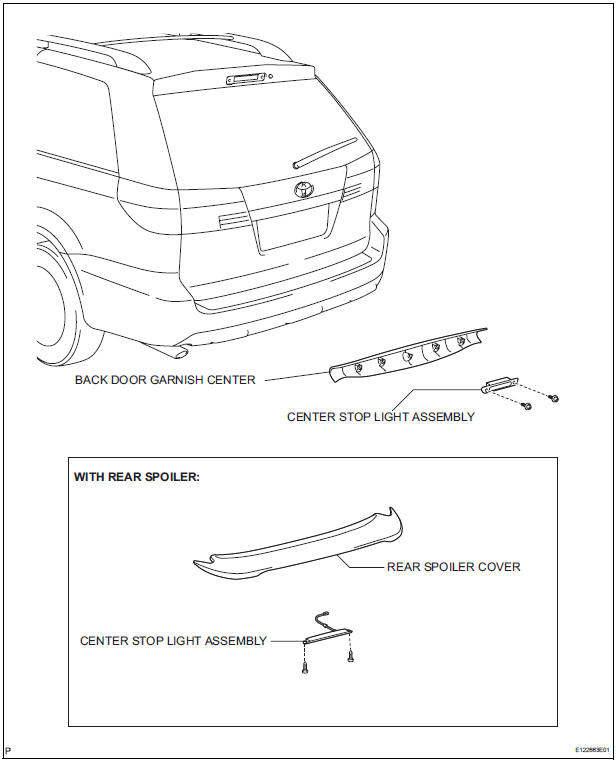
REMOVAL
1. REMOVE BACK DOOR GARNISH CENTER (w/ Rear Spoiler)
2. REMOVE REAR SPOILER COVER (w/ Rear Spoiler)
3. REMOVE CENTER STOP LIGHT ASSEMBLY
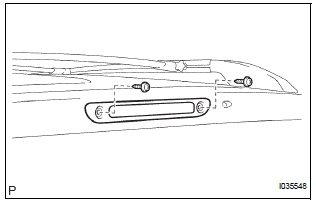
- w/o Rear spoiler:
- Disconnect the connector and remove the 2 screws and the center stop light assembly.
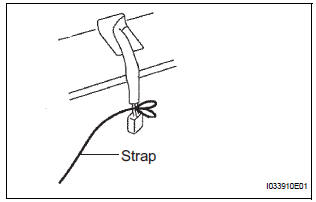
- w/ Rear spoiler:
- Install the strap on the connector of the center stop light assembly.
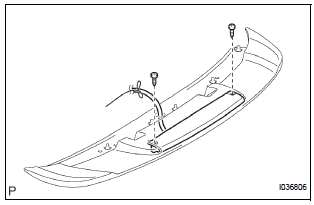
- w/ Rear spoiler:
- Remove the 2 screws.
- w/ Rear spoiler:
- Pass the connector through the inside of the rear spoiler sub-assembly, and remove the center stop light assembly.
HINT: Leave the strap inside the rear spoiler subassembly.
INSTALLATION
1. INSTALL CENTER STOP LIGHT ASSEMBLY
2. INSTALL REAR SPOILER COVER
3. INSTALL BACK DOOR GARNISH CENTER
 License plate light assembly
COMPONENTS
REMOVAL
1. REMOVE BACK DOOR GARNISH CENTER
2. REMOVE BACK DOOR SIDE GARNISH LH
3. REMOVE BACK DOOR SIDE GARNISH RH
4. REMOVE BACK DOOR STRAP COVER
5. REMOVE BACK DOOR PULL STR ...
 Personal light assembly
ON-VEHICLE INSPECTION
1. ROOF CONSOLE BOX ASSEMBLY
Inspect map light assembly resistance.
Check the resistance between the terminals at
each switch position as shown in th ...
Other materials:
Disassembly
1. REMOVE BACK DOOR GARNISH CENTER
Using a clip remover, disengage the 5 clips and
remove the garnish center.
2. REMOVE BACK DOOR SIDE GARNISH LH
Using a clip remover, disengage the 3 clips and
remove the side garnish.
3. REMOVE BACK DOOR SIDE GARNISH RH
Using a clip remove ...
Deleting the contact data
For PBAP compatible Bluetooth® phones, this function is available when
“Automatic Transfer� is set to off.
Select “Delete Contacts�.
Select the desired contact and select “Delete�.
Select “Yes� when the confirmation screen appears.
Deleting the contact in a different w ...
Installation
1. INSTALL HEADLIGHT ASSEMBLY
Connect the connectors.
Install the headlight assembly with the bolt and 3
screws.
2. INSTALL FRONT BUMPER ASSEMBLY
3. CONNECT CABLE TO NEGATIVE BATTERY
TERMINAL
4. VEHICLE PREPARATION FOR HEADLIGHT AIMING
5. PREPARATION FOR HEADLIGHT AIMI ...
