
Toyota Sienna Service Manual: Inspection
1. INSPECT REAR SPEED SENSOR
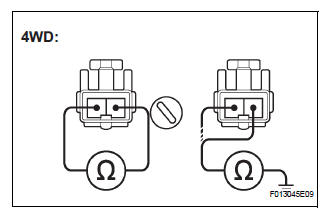
(a) Remove the seat cushion and seatback.
(b) Disconnect the speed sensor connector.
(c) Measure the resistance between terminals 1 and 2 of the speed sensor connector
OK: Resistance: 1.1 +- 0.2 kΩ at 25 +- 5 °C
(d) Measure the resistance between each of terminals 1 and 2 of skid control sensor connector and body ground.
OK: Resistance: 1 MΩ or higher
NOTICE: Check the speed sensor signal last (See page BC-10).
 Removal
HINT:
Remove the RH side by the same procedure as the LH side.
1. REMOVE REAR WHEEL
2. REMOVE QUARTER TRIM PANEL ASSEMBLY
FRONT LH
HINT:
Remove the LH side by the same procedure as the RH
side ...
 Installation
HINT:
Install the RH side by same procedure as the LH side.
1. INSTALL REAR SPEED SENSOR
(a) Install the speed sensor rear LH with the bolt.
Torque: 8.0 N*m (82 kgf*cm, 71 in.*lbf)
NOTICE:
K ...
Other materials:
Shifting the shift lever
While the engine switch is in the
“ON� position (vehicles without a
smart key system) or IGNITION ON mode (vehicles with a smart
key system), move the shift lever with the brake pedal
depressed.
When shifting the shift lever between P and D, make sure that the vehicle
is completely ...
Removal
1. DISCHARGE FUEL SYSTEM PRESSURE
HINT:
See page FU-1.
2. DISCONNECT CABLE FROM NEGATIVE BATTERY
TERMINAL
3. REMOVE NO. 1 ENGINE UNDER COVER
4. DRAIN ENGINE COOLANT (See page CO-6)
5. REMOVE FRONT WIPER ARM HEAD CAP (See page
WW-4)
6. REMOVE FRONT WIPER ARM RH (See page WW-4)
7. REMOVE FRO ...
Coolant Thermostat (Coolant Temperature Below Thermostat Regulating
Temperature)
HINT:
This DTC relates to the thermostat.
DESCRIPTION
This DTC is set when the Engine Coolant Temperature (ECT) does not reach 75°C
(167°F) despite
sufficient engine warm-up time.
MONITOR DESCRIPTION
The ECM estimates the ECT based on the starting temperature, engine loads,
a ...
