
Toyota Sienna Service Manual: Lubrication system
On-vehicle inspection
1. CHECK ENGINE OIL LEVEL
(a) Warm up the engine, stop it and wait 5 minutes. The oil level should be between the dipstick's low level mark and full level mark.
If the engine oil level is low, check for leakage and add oil up to the full level mark.
| NOTICE: Do not add engine oil above the full level mark. |
2. CHECK ENGINE OIL
(a) Check the engine oil for deterioration, water contamination, discoloring or thinning.
If the oil is bad, replace the engine oil and engine oil filter.
3. CHECK OIL PRESSURE
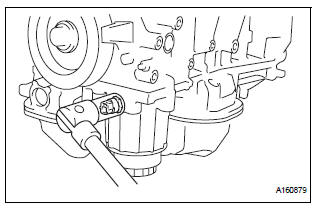
(a) Disconnect the oil pressure switch connector.
(b) Using a 24 mm deep socket wrench, remove the oil pressure switch.
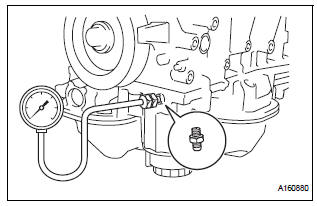
(c) Install the oil pressure gauge with adapter.
(d) Warm up the engine.
(e) Check the oil pressure.
Standard oil pressure 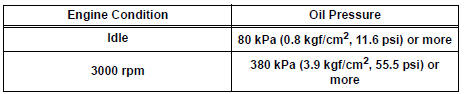
If the oil pressure is not as specified, check the oil pump (See page LU-13).
(f) Remove the oil pressure gauge.
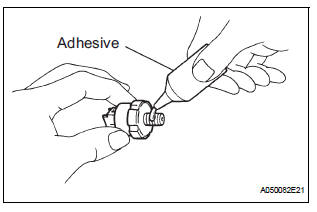
(g) Apply adhesive to 2 or 3 threads of the oil pressure switch.
Adhesive: Toyota Genuine Adhesive 1344, Three Bond 1344 or equivalent
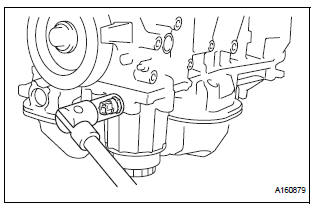
(h) Using a 24 mm deep socket wrench, install the oil pressure switch.
Torque: 15 N*m (153 kgf*cm, 11 ft.*lbf)
| NOTICE: Do not start the engine within 1 hour after installation. |
(i) Connect the oil pressure switch connector.
(j) Check for engine oil leaks.

 Oil and oil filter
COMPONENTS
REPLACEMENT
CAUTION:
Prolonged and repeated contact with engine oil will
result in the removal of natural oils from the skin,
leading to dryness, irritation and derma ...
Other materials:
Short to GND in Rear Curtain Shield Squib RH
Circuit
DTC B1632/81 Short to GND in Rear Curtain Shield Squib RH
Circuit
DESCRIPTION
The rear curtain shield squib RH circuit consists of the center airbag sensor
assembly and the curtain
shield airbag assembly RH.
The circuit instructs the SRS to deploy when deployment conditions are met.
DTC ...
Front Airbag Sensor LH Circuit Malfunction
DTC B1149/37 Front Airbag Sensor LH Circuit Malfunction
DESCRIPTION
The front airbag sensor LH circuit consists of the center airbag sensor
assembly and front airbag sensor
LH.
If the center airbag sensor assembly receives signals from the front airbag
sensor LH, it judges whether or
not ...
Problem symptoms table
WINDOW DEFOGGER SYSTEM
Symptom
Suspected area
w/ Deicer: Front window deicer does not operate.
(indicator light ON)
FR DEF fuse
Front window deicer relay
Front window deicer wire
Wire harness
w/ deicer: Front window deicer ...
