
Toyota Sienna Service Manual: On-vehicle Inspection
1. CHECK STEERING WHEEL FREEPLAY
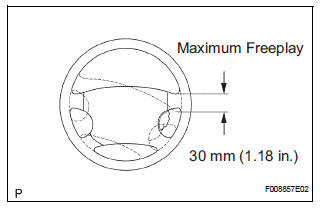
(a) Stop the vehicle and face the tires straight ahead.
(b) Rock the steering wheel gently up and down with your hand, check the steering wheel freeplay.
Maximum freeplay: 30 mm (1.18 in.)
 Problem Symptoms Table
HINT:
Use the table below to help determine the cause of the
problem. Likely causes of the problem are indicated in
descending order. Check each suspected area in order.
Repair or replace the fa ...
 Repair
1. STEERING OFF CENTER REPAIR PROCEDURE
(a) Inspect steering wheel off center.
(1) Apply masking tape to the top center of the
steering wheel and steering column upper
cover.
(2) Drive th ...
Other materials:
Room temperature sensor (for rear air conditioning system)
ON-VEHICLE INSPECTION
1. INSPECT REAR A/C ROOM TEMPERATURE SENSOR
(a) Remove the rear A/C room temperature sensor.
(b) Disconnect the connector from the rear A/C room
temperature sensor.
(c) Measure the resistance according to the value(s) in
the table below.
Standard resistance
NOTI ...
For vehicles equipped with srs airbag and seat belt pretensioner
The SIENNA is equipped with a Supplemental Restraint System (SRS).
CAUTION: Failure to carry out the service operations in the correct sequence could cause the SRS to unexpectedly deploy during servicing and lead to serious injury. Furthermore, if a mistake is made when servicing SRS, it is poss ...
Removal
1. PRECAUTION
HINT:
See page RS-1
2. DISCONNECT BATTERY NEGATIVE TERMINAL
Wait for 90 seconds after disconnecting the battery
terminal to prevent the airbag working.
3. PLACE FRONT WHEELS FACING STRAIGHT AHEAD
4. REMOVE STEERING WHEEL COVER LOWER NO.2
(See page RS-424)
5. REMOVE STEERING WH ...
