
Toyota Sienna Service Manual: On-vehicle inspection
1. INSPECT FRONT PASSENGER AIRBAG ASSEMBLY (VEHICLE NOT INVOLVED IN COLLISION)
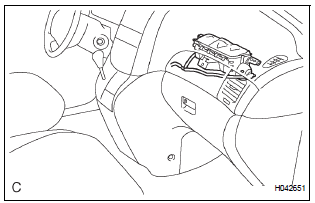
- Perform a diagnostic system check.
- With the front passenger airbag assembly installed on the vehicle, perform a visual check. If there are any defects as mentioned below, replace the instrument panel with a new one: Cuts, minute cracks or marked discoloration on the instrument panel around the front passenger airbag assembly.
2. INSPECT FRONT PASSENGER AIRBAG ASSEMBLY (VEHICLE INVOLVED IN COLLISION AND AIRBAG HAS NOT DEPLOYED)
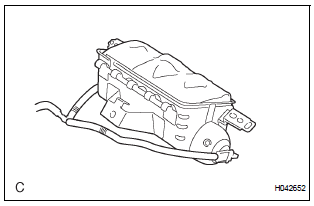
- Perform a diagnostic system check.
- With the front passenger airbag assembly removed from the vehicle, perform a visual check. If there are any defects as mentioned below, replace the front passenger airbag assembly, instrument panel or instrument panel reinforcement with a new one:
- Cuts, minute cracks or marked discoloration on the front passenger airbag assembly.
- Cracks or other damage to the connectors.
- Deformation or cracks on the instrument panel or instrument panel reinforcement.
HINT: There should be no interference between the instrument panel and the front passenger airbag assembly.
CAUTION: Be sure to follow the correct removal and installation procedures.
 Front passenger airbag assembly
COMPONENTS
...
 Removal
1. PRECAUTION
CAUTION: Be sure to read "PRECAUTION" thoroughly before
servicing.
2. DISCONNECT CABLE FROM NEGATIVE BATTERY
TERMINAL
CAUTION:
Wait for 90 seconds after disconnecting th ...
Other materials:
Removal
1. REMOVE INSTRUMENT CLUSTER CENTER NO. 1 FINISH PANEL
2. REMOVE INSTRUMENT CLUSTER CENTER NO. 2
FINISH PANEL
3. REMOVE SHIFT LEVER KNOB SUB-ASSEMBLY
4. REMOVE POSITION INDICATOR HOUSING ASSEMBLY
5. REMOVE INSTRUMENT CLUSTER CENTER LOWER FINISH PANEL SUB-ASSEMBLY
6. REMOVE CIGARETTE LIGHTER CO ...
Problem symptoms table
POWER WINDOW CONTROL SYSTEM (W/O JAM PROTECTION)
Symptom
Suspected Area
All power windows do not operate
PWR fuse
Power window relay (Marking: P/W)
Ignition switch
Power window regulator master switch
Power window regulator motor assembly
...
Diagnosis system
1. BUS CHECK
Select "BUS CHECK" from the "OBD/MOBD
MENU" screen.
HINT:
The ECUs and sensors that are properly connected
to the CAN communication system can be displayed
using the intelligent tester via the CAN VIM.
Press "ENTER" on the intelligent te ...
