
Toyota Sienna Service Manual: On-vehicle inspection
1. INSPECT THROTTLE BODY
(a) Listen to the throttle control motor operating sounds.
(1) Turn the ignition switch to the ON position.
(2) When pressing the accelerator pedal position sensor lever, listen to the running motor. Make sure that no friction noise comes from the motor.
If friction noise exists, replace the throttle body.
(b) Inspect the throttle position sensor.
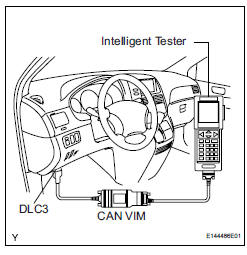
(1) Connect the intelligent tester to the DLC3.
(2) Turn the ignition switch to the ON position.
(3) Check that the MIL turns off.
(4) Under CURRENT DATA, the throttle valve opening percentage (THROTTLE POS) should be within the standard range below.
Standard throttle valve opening percentage: 60% or more If the percentage is less than 60%, replace the throttle body.
| NOTICE: When checking the throttle valve opening percentage, the transmission should be in neutral. |
 Throttle body
COMPONENTS
...
 Removal
1. Remove windshield wiper motor assembly
hint:
(see page ww-4)
2. Remove front outer cowl top panel subassembly
(see page em-27)
3. Drain engine coolant (see page co-6)
4. Remove v-bank cover s ...
Other materials:
Removal
HINT:
Remove the RH side by the same procedure as the LH side.
1. REMOVE FRONT WHEEL
2. DRAIN BRAKE FLUID
NOTICE:
Wash the brake fluid off immediately if it attaches to
any painted surface.
3. REMOVE FRONT DISC BRAKE CYLINDER SUBASSEMBLY
(a) Remove the union bolt and 2 gaskets from the f ...
Removal
1. DISCONNECT CABLE FROM NEGATIVE BATTERY
TERMINAL
CAUTION:
Wait for 90 seconds after disconnecting the cable to
prevent the airbag working.
2. REMOVE FRONT SEAT ASSEMBLY
HINT:
Refer to the instructions for removal of the front seat
assembly (for flat type).
Refer to the in ...
Front Occupant Classification Sensor RH Circuit
Malfunction
DTC B1781 Front Occupant Classification Sensor RH Circuit
Malfunction
DESCRIPTION
The front occupant classification sensor RH circuit consists of the occupant
classification ECU and the
front occupant classification sensor RH.
DTC B1781 is recorded when a malfunction is detected in the fron ...
