
Toyota Sienna 2010-2026 Owners Manual: Operation
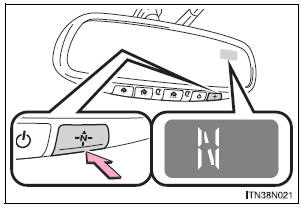
To turn the compass on or off, press the switch.
Displays and directions
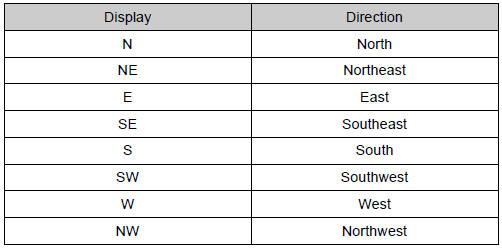
 Compass
The compass on the inside rear view mirror indicates the direction
in which the vehicle is heading. ...
 Calibrating the compass
The direction display deviates from the true direction determined by
the earth’s magnetic field. The amount of deviation varies according to
the geographic position of the vehicle.
If you c ...
Other materials:
System description
1. DESCRIPTION OF POWER REAR NO. 2 SEAT WITH
STOWING FUNCTION
A power rear no. 2 seat with stowing function has
been adopted for the third-row seats.
The power rear no. 2 seat with stowing function
electrically stows and returns the seat when the
power folding seat switch is ...
Rear wiper rubber
COMPONENTS
REMOVAL
1. REMOVE REAR WIPER BLADE ASSEMBLY
Remove the rear wiper arm head cap from the rear
wiper arm.
Raise the rear wiper blade to the position as shown
in the illustration where the meshing of the claw is
disengaged with the click sound.
NOTICE:
...
Removal
1. PRECAUTION
CAUTION:
Be sure to read "PRECAUTION" thoroughly before
servicing.
2. DISCONNECT CABLE FROM NEGATIVE BATTERY
TERMINAL
CAUTION:
Wait for 90 seconds after disconnecting the cable to
prevent the airbag working.
3. REMOVE FRONT SEAT ASSEMBLY (for Manual Seat)
4. REMOVE ...
