
Toyota Sienna 2010-2026 Owners Manual: Personal/interior light main switch
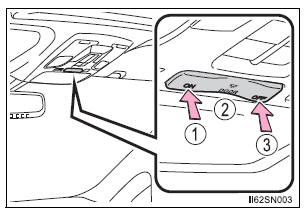
- Turns the lights on
- Turns the door position on
- Turns the lights off
 Interior lights list
Rear personal/interior lights
Rear ceiling lights (if equipped)
Front personal/interior lights
Engine switch light
Front door courtesy lights (if equipped)
Outer foot lights (if eq ...
 Personal/interior
lights
Personal/interior
lights
Front
Turns the light on/off
Rear
Turns the light on/off
When the personal/interior light main switch is in the off position, the
rear personal lights will not turn on even if the switch is o ...
Other materials:
Horn
To sound the horn, press on or
close to the mark.
WARNINGCaution while driving
Do not adjust the steering wheel while driving.
Doing so may cause the driver to mishandle the vehicle and cause an
accident,
resulting in death or serious injury.
After adjusting the steeri ...
Turn signal light switch
ON-VEHICLE INSPECTION
1. INSPECT TURN SIGNAL FLASHER CIRCUIT
Measure voltage between the terminals as shown in
the chart below.
Voltage
Connect the connector to turn the signal flasher and
turn the ignition switch ON, and inspect the wire
harness side connector from t ...
Inspection
1. INSPECT FRONT SPEED SENSOR
(a) Make sure that there is no looseness at the
connector lock part and connecting part of the
connector.
(b) Disconnect the speed sensor connector.
(c) Measure the resistance between terminals 1 and 2
of the speed sensor connector.
OK:
Resistance:
0.92 ...
