
Toyota Sienna Service Manual: Power steering fluid
Bleeding
1. BLEED POWER STEERING SYSTEM
(a) Check the fluid level (See page PS-2).
(b) Jack up the front of the vehicle and support it with stands.
(c) Turn the steering wheel.
(1) With the engine stopped, turn the steering wheel slowly from lock to lock several times.
(d) Lower the vehicle.
(e) Start the engine.
(1) Run the engine at idle for a few minutes.
(f) Turn the steering wheel.
(1) With the engine idling, turn the steering wheel left or right to the full lock position and keep it in that position for 2 to 3 seconds, then turn the steering wheel to the opposite full lock position and keep it there for 2 to 3 seconds.
(2) Repeat this procedure several times.
(g) Stop the engine.
(h) Check for foaming or emulsification.
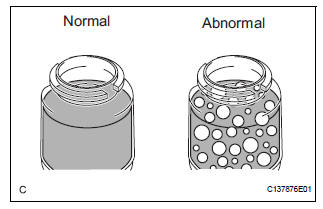
HINT: If the system has to be bled twice because of forming or emulsification, be sure to check for fluid leaks in the system.
(i) Check the fluid level (See page PS-2).
 On-vehicle inspection
1. INSPECT DRIVE BELT
(a) Visually check the drive belt for excessive wear,
frayed cords, etc.
If any defect is found, replace the drive belt.
HINT:
Cracks on the rib side of a belt are con ...
 Vane pump
COMPONENTS
...
Other materials:
Installation
1. INSTALL SLIDE DOOR ROLLER ASSEMBLY UPPER
Apply MP grease to the rotating areas of the roller.
Install the roller with the 2 bolts.
Torque: 13 N*m (130 kgf*cm, 10 ft.*lbf)
2. INSTALL SLIDE DOOR HINGE ASSEMBLY CENTER LH
Apply MP grease to the rotating areas of the hinge.
In ...
Settings display
The settings of the following items can be changed, refer to
Language
Select to change the language on the display.
Units
Select to change the unit for measure of the fuel consumption and
outside temperature.
Eco Driving Indicator Light
Select to activate/deactivate the Eco Driving ...
How to register a Bluetooth® device
Display the “Bluetooth* Setup� screen.
*: Bluetooth is a registered trademark of Bluetooth SIG, Inc.
Select “Add�.
When this screen is displayed,
search for the device name displayed
on this screen on the
screen of your Bluetooth®
device.
For details about operati ...
