
Toyota Sienna Service Manual: Problem symptoms table
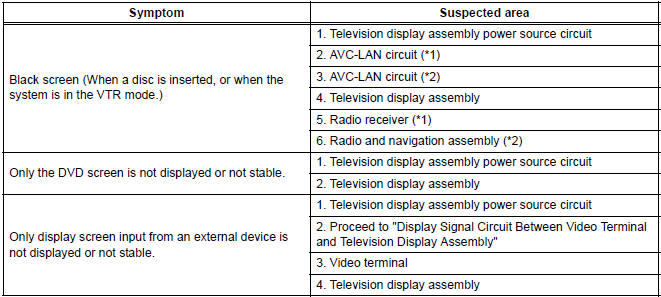
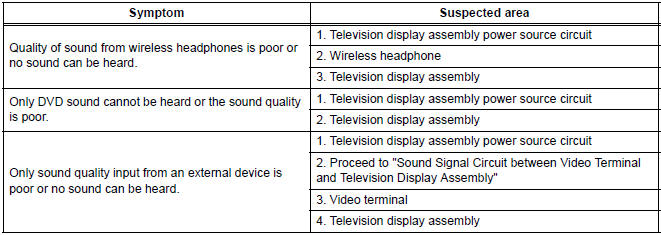
HINT: Inspect the "Fuse" and "Relay" before confirming the suspected area as shown in the table below.
DISPLAY FUNCTION:
SOUND FUNCTION:
REMOTE CONTROL FUNCTION:
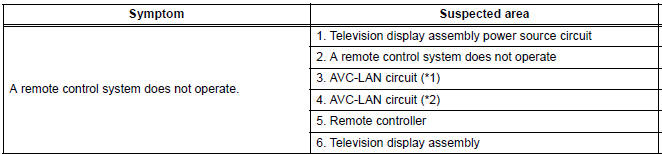
*1: without Navigation System
*2: with Navigation System
 How to proceed with
troubleshooting
How to proceed with
troubleshooting
1 VEHICLE BROUGHT TO WORKSHOP
2 CUSTOMER PROBLEM ANALYSIS
Interview the customer and confirm the trouble.
Confirm the problem by duplicating the conditions
described by the customer
3 ...
 Terminals of ECU
1. TELEVISION DISPLAY ASSEMBLY
*1: with Navigation System ...
Other materials:
On-vehicle inspection
1. CHECK SEAT HEATER CONTROL (WIRE HARNESS
SIDE)
Disconnect the connector from the seat heater
control.
Measure the voltage and resistance of each
terminal of the wire harness side connector.
Standard
If the result is not as specified, there may be a
malfunction on ...
On-vehicle inspection
1. INSPECT THROTTLE BODY
Listen to the throttle control motor operating sounds.
Turn the ignition switch to the ON position.
When pressing the accelerator pedal position
sensor lever, listen to the running motor. Make
sure that no friction noise comes from the
motor.
...
Installation
1. INSTALL HEADLIGHT ASSEMBLY
Connect the connectors.
Install the headlight assembly with the bolt and 3
screws.
2. INSTALL FRONT BUMPER ASSEMBLY
3. CONNECT CABLE TO NEGATIVE BATTERY
TERMINAL
4. VEHICLE PREPARATION FOR HEADLIGHT AIMING
5. PREPARATION FOR HEADLIGHT AIMI ...
