
Toyota Sienna Service Manual: Rear differential carrier
COMPONENTS
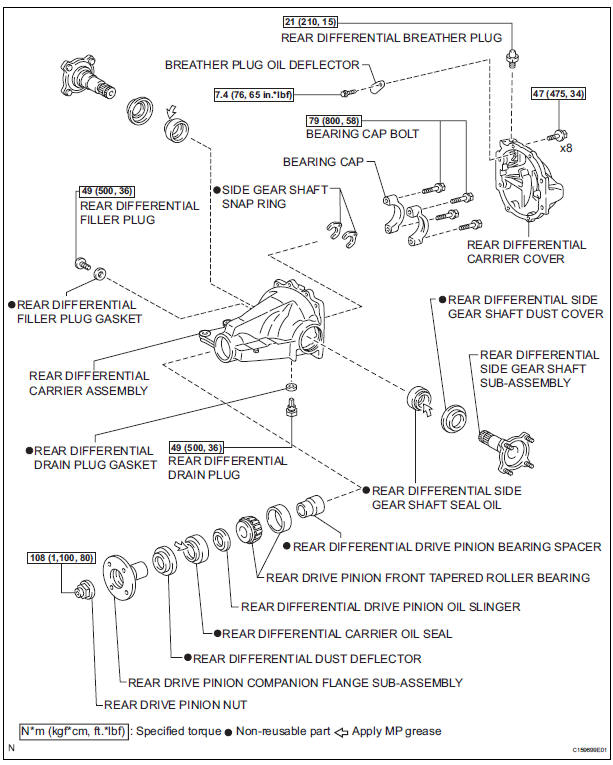
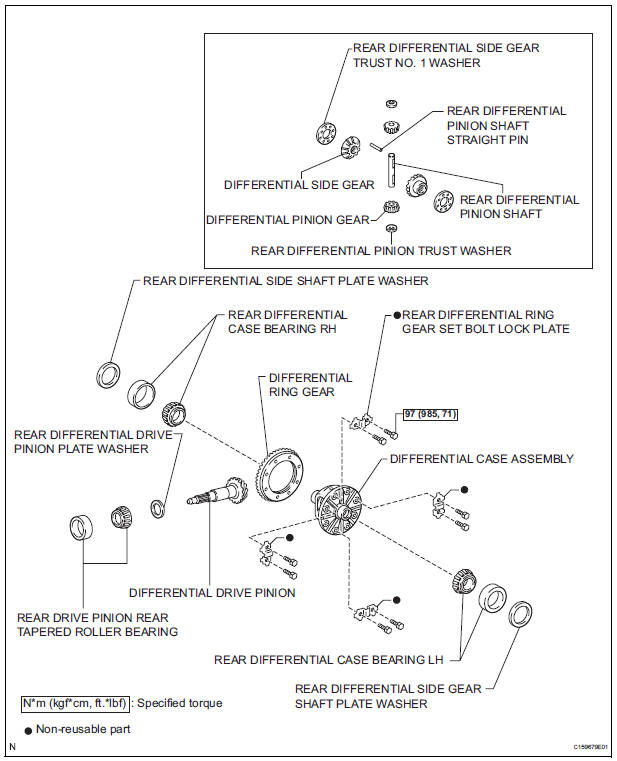
 Installation
1. INSTALL NO. 1 REAR DIFFERENTIAL SUPPORT
(a) Install the No. 1 rear differential support to the rear
differential carrier assembly with the 2 bolts and 2
nuts.
Torque: 85 N*m (867 kgf*cm, 63 ...
 Disassembly
1. REMOVE REAR DIFFERENTIAL CARRIER COVER
(a) Remove the 8 bolts from the carrier cover.
(b) Using a brass bar and a hammer, separate the
carrier cover from rear differential carrier assembly ...
Other materials:
Manual headlight leveling dial (vehicles with discharge headlights)
The level of the headlight aim can be adjusted according to the number
of passengers and the loading condition of the vehicle.
Raises the level of the headlights
Lowers the level of the headlights
Guide to dial settings
Daytime running light system (if equipped)
Bulb type: To ...
Pressing Power Switch does not Turn on System
INSPECTION PROCEDURE
1 CHECK VEHICLE CONDITION
Check that conditions in the cabin are not likely to cause
condensation.
HINT:
This problem occurs when the cabin is humid and the
temperature changes rapidly. This may produce
condensation, resulting in a short circuit.
OK:
Condensation ...
Rear power window switch
INSPECTION
1. INSPECT POWER WINDOW REGULATOR SWITCH ASSEMBLY REAR
Check the resistance between the switch terminals
when the switch is operated.
Standard
If the result is not as specified, replace the switch
assembly. ...
