
Toyota Sienna Service Manual: Removal
HINT: Remove the RH side by the same procedure as the LH side.
1. REMOVE REAR WHEEL
2. DRAIN BRAKE FLUID
NOTICE: Wash the brake fluid off immediately if it attaches to any painted surface.
3. SEPARATE REAR BRAKE TUBE NO.4
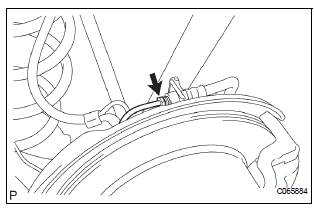
(a) Remove the clip and a disconnect, the rear brake flexible hose.
(b) Using SST and spanner loosen the rear brake tube No. 4.
SST 09023-00101
4. SEPARATE REAR LH FLEXIBLE HOSE
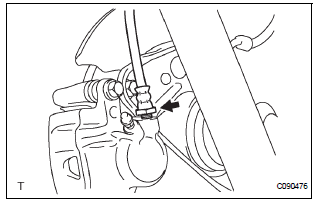
(a) Using SST, remove the rear brake flexible hose.
SST 09023-12701
5. REMOVE DISC BRAKE CYLINDER ASSEMBLY REAR LH
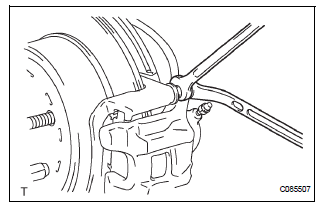
(a) Hold the rear disc brake cylinder slide pin and remove the 2 bolts.
(b) Remove the disc brake cylinder assembly rear LH from the rear disc brake cylinder mounting LH.
6. REMOVE REAR DISC BRAKE CYLINDER SLIDE PIN
(a) Remove the 2 rear disc brake cylinder slide pins from the rear disc brake cylinder mounting LH.
7. REMOVE REAR DISC BRAKE BUSH DUST BOOT
(a) Remove the 2 rear disc brake bush dust boots.
8. REMOVE DISC BRAKE PAD KIT REAR (PAD ONLY)
(a) Remove the disc brake pad kit rear.
9. REMOVE REAR DISC BRAKE ANTI SQUEAL SHIM KIT
(a) Remove the anti squeal shim No. 1 and anti squeal shim No. 2 from each pad.
10. REMOVE REAR DISC BRAKE PAD SUPPORT PLATE
(a) Remove the rear disc brake pad support plate (No.
1) and rear disc brake pad support plate (No. 2) from the rear disc brake cylinder mounting LH.
11. REMOVE REAR DISC BRAKE CYLINDER MOUNTING LH
(a) Remove the bolts and rear disc brake cylinder mounting LH.
 Rear disc brake
COMPONENTS
...
 Disassembly
1. REMOVE CYLINDER BOOT
(a) Using a screwdriver, remove the set ring and
cylinder boot.
2. REMOVE REAR DISC BRAKE PISTON
(a) Place a shop rug, between the rear disc brake
piston and the disc ...
Other materials:
Diagnostic trouble code chart
COMMUNICATION DIAGNOSIS:
SW:
SW WITH NAME:
SW CONVERTING:
COMMAND SW:
FRONT MONITOR:
DVD PLAYER:
TELEPHONE:
NAVI:
IN-DASH CD CHANGER:
GPS:
CAMERA UNIT:
...
Inspection
1. Inspect generator clutch pulley
(a) Hold the center of the pulley, and confirm that the
outer ring turns counterclockwise and does not turn
clockwise.
If the result is not as specified, replace the clutch
pulley.
2. Remove generator drive end frame bearing
(a) Check that the bear ...
MIL Circuit
DESCRIPTION
The MIL (Malfunction Indicator Lamp) is used to indicate vehicle malfunctions
detected by the ECM.
When the ignition switch is turned to the ON position, power is supplied to the
MIL circuit, and the ECM
provides the circuit ground which illuminates the MIL.
The MIL operation ...
