
Toyota Sienna Service Manual: Removal
1. PRECAUTION
CAUTION: Be sure to read "PRECAUTION" thoroughly before servicing.
2. DISCONNECT CABLE FROM NEGATIVE BATTERY TERMINAL
CAUTION: Wait for 90 seconds after disconnecting the cable to prevent the airbag working.
3. REMOVE FRONT SEAT ASSEMBLY (for Manual Seat)
4. REMOVE FRONT SEAT ASSEMBLY (for Power Seat)
5. REMOVE RECLINING ADJUSTER RELEASE HANDLE LH (for Manual Seat)
6. REMOVE VERTICAL SEAT ADJUSTER KNOB CAP (for Manual Seat)
7. REMOVE VERTICAL ADJUSTING HANDLE NO.2 (for Manual Seat)
8. REMOVE FRONT SEAT CUSHION SHIELD LH (for Manual Seat)
9. REMOVE SLIDE AND VERTICAL POWER SEAT SWITCH KNOB (for Power Seat)
10. REMOVE RECLINING POWER SEAT SWITCH KNOB (for Power Seat)
11. REMOVE FRONT SEAT CUSHION SHIELD ASSEMBLY
- Remove the 5 screws and the front seat cushion shield assembly.
12. REMOVE SEAT SLIDE POSITION SENSOR PROTECTOR
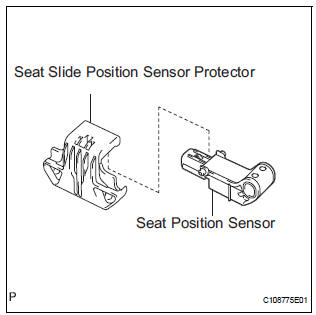
- Remove the seat slide position sensor protector from the seat position sensor.
13. REMOVE SEAT POSITION SENSOR
- Disconnect the connector from the seat position sensor.
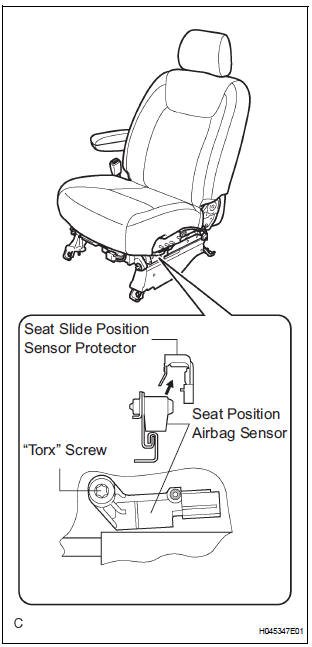
- Using a "torx" socket wrench (T30), remove the "torx" screw and the seat position sensor.
 On-vehicle inspection
1. INSPECT SEAT POSITION SENSOR (VEHICLE NOT
INVOLVED IN COLLISION)
Perform a diagnostic system check.
2. INSPECT SEAT POSITION SENSOR (VEHICLE
INVOLVED IN COLLISION)
Perform ...
 Installation
1. INSTALL SEAT POSITION AIRBAG SENSOR
Check that the ignition switch is off.
Check that the negative battery (-) terminal is
disconnected.
CAUTION:
After disconnecting the ...
Other materials:
Stereo Component Amplifier Power Source Circuit
DESCRIPTION
This circuit provides power to the stereo component amplifier.
WIRING DIAGRAM
INSPECTION PROCEDURE
1 INSPECT STEREO COMPONENT AMPLIFIER
Disconnect the stereo component amplifier connector.
Measure the resistance according to the value(s) in the
table below.
S ...
Casual speech recognization
Due to natural language speech recognition technology, this system
enables recognition of a command when spoken naturally. However,
the system cannot recognize every variation of each command.
In some situations, it is possible to omit the command for the procedure
and directly state the desir ...
Brake fluid
Checking fluid level
The brake fluid level should be
between the “MAX� and “MIN�
lines on the tank.
“MAX� line
“MIN� line
Adding fluid
Lift the cover off.
Make sure to check the fluid type and prepare the necessary item.
Brake fluid can absorb moisture from t ...
