
Toyota Sienna Service Manual: Removal
1. Remove no. 2 Air cleaner inlet (see page em- 28) 2. Remove air cleaner cap sub-assembly
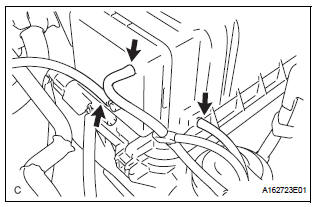
(a) Disconnect the 3 vacuum hoses.
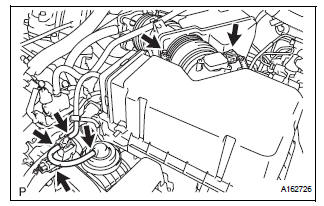
(b) Loosen the bolt, disconnect the 2 connectors, and remove the 2 vacuum hoses.
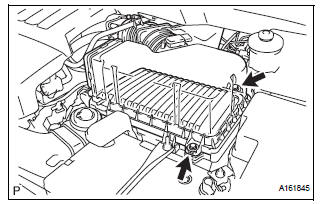
(c) Remove the 2 bolts, air cleaner cap sub-assembly, and air cleaner filter element.
3. REMOVE NO. 3 INTAKE AIR CONTROL VALVE ASSEMBLY
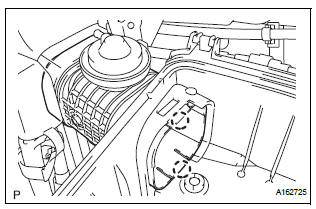
(a) Disengage the 2 claws and remove the No. 3 intake air control valve assembly.
 On-vehicle inspection
1. Inspect intake air surge tank assembly
(A) inspection procedure when applying voltage
between the terminals:
(1) Disconnect the connector from the intake air
control valve.
(2) Apply bat ...
 Inspection
1. Inspect no. 3 Intake air control valve
assembly
(A) inspect actuator operation.
(1) With 26.7 Kpa (200 mm hg, 7.9 In. Hg) of
vacuum applied to the actuator, check that the
actuator rod m ...
Other materials:
CD Sound Skips
INSPECTION PROCEDURE
1 CHECK CD
Check the CD.
OK:
The CD is clean.
HINT:
If dirt is on the CD surface, wipe it clean with a soft cloth
from the inside to the outside in a radial direction.
NOTICE:
Do not use a conventional record cleaner or antistatic
preservative.
2 CHECK CD
...
SRS Warning Light does not Come ON
DESCRIPTION
WIRING DIAGRAM
INSPECTION PROCEDURE
1 CHECK BATTERY
Measure the voltage of the battery.
Standard voltage:
11 to 14 V
CHECK AND REPLACE BATTERY OR
CHARGING SYSTEM
2 CHECK CONNECTORS
Turn the ignition switch to the LOCK position.
Disconnect the negative (-) term ...
Pressure Control Solenoid "A" Electrical (Shift
Solenoid Valve SL1)
DESCRIPTION
Shifting from 1st to 5th is performed in combination with "ON" and "OFF"
operation of the shift solenoid
valves SL1, SL2, SL3, S4 and SR which are controlled by the ECM. If an open or
short circuit occurs in
either of the shift solenoid valves, the ECM cont ...
