
Toyota Sienna 2010-2026 Owners Manual: Roof luggage carrier (if equipped)
Roof luggage carrier components
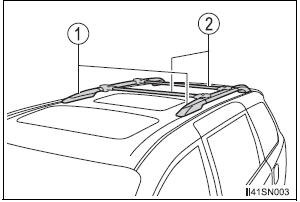
- Roof rails
- Cross rails
Adjusting the position of cross rails
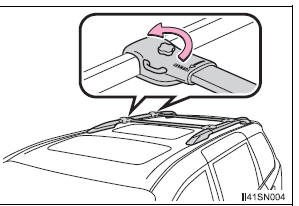
- Turn the knobs counterclockwise to release the cross rails.
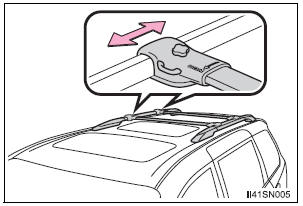
- Slide the cross rails to the appropriate position for loading luggage and turn the knobs clockwise to tighten the cross rails securely.
 Calculation formula for your vehicle
Cargo capacity
Total load capacity (vehicle capacity weight)
When 2 people with the combined weight of A lb. (kg) are riding in
your vehicle, which has a total load capacity (vehicle cap ...
 Seating configuration variation
Cargo capacity
Weight of the removed second
seat
If removing the second seats, it is possible to load extra cargo equal
to the weight of the removed seats.
(Cargo capacity) = (Total ...
Other materials:
Reassembly
1. INSTALL PLANETARY GEAR
(a) Apply grease to the planetary gears and pin parts of
the planetary shaft.
(b) Install the 3 planetary gears.
2. INSTALL STARTER ARMATURE ASSEMBLY
(a) Apply grease to the plate washer and the armature
shaft.
(b) Install the starter armature to the star ...
How to proceed with
troubleshooting
HINT:
Troubleshooting of the wireless door lock control system is
based on the premise that the power door lock system, the
power slide door system, the power back door system and
the power window system are operating normally.
Therefore, before troubleshooting the wireless door lo ...
Pressing Power Switch does not Turn on System
INSPECTION PROCEDURE
1 CHECK VEHICLE CONDITION
Check that conditions in the cabin are not likely to cause
condensation.
HINT:
This problem occurs when the cabin is humid and the
temperature changes rapidly. This may produce
condensation, resulting in a short circuit.
OK:
Condensation ...
