
Toyota Sienna Service Manual: SFR Solenoid Circuit
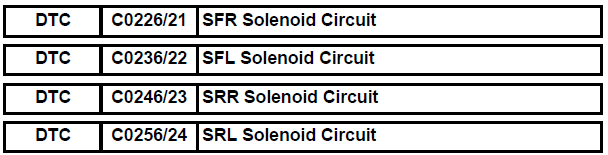
DESCRIPTION
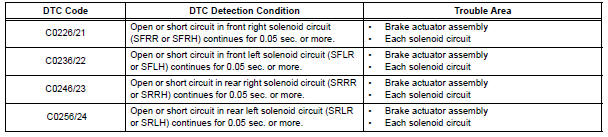
This solenoid goes on when signals are received from the ECU and controls the pressure acting on the wheel cylinders to control the braking force.
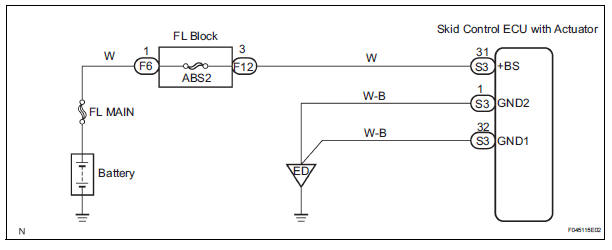
WIRING DIAGRAM
INSPECTION PROCEDURE
1 RECONFIRM DTC
HINT: This code is detected when a problem is determined in the brake actuator assembly.
The solenoid circuit is in the brake actuator assembly.
Therefore, solenoid circuit inspection and solenoid unit inspection cannot be performed. Be sure to check if the DTC code is output before replacing the brake actuator assembly.
(a) Clear the DTCs (See page BC-82).
(b) Turn the ignition switch to the ON position.
(c) Are the same DTCs recorded?
Result 
NOTICE: When replacing the brake actuator assembly, perform zero point calibration (See page BC-70).


REPLACE BRAKE ACTUATOR ASSEMBLY
 Right Rear Wheel Speed Sensor Signal
DESCRIPTION
Refer to DTCs C0200/31, C0205/32, C1235/35 and C1236/36 (See page BC-92).
HINT:
DTC C0210/33 and C1238/38 are for the right rear speed sensor.
DTC C0215/34 and C1239/39 are ...
 Open or Short Circuit in ABS Motor Relay Circuit
DESCRIPTION
The ABS motor relay supplies power to the ABS pump motor. While the ABS &
TRAC & VSC are
activated, the ECU switches the ABS motor relay ON and operates the ABS pump
moto ...
Other materials:
Terminals of ecu
1. Terminal of ECU
(*1): Models with dynamic laser cruise control
(*2): 2WD model
2. Terminal Inspection
(a) Disconnect the connector and measure the voltage
or resistance on the wire harness side.
HINT:
Voltage cannot be measured with the connector
connected to the skid control ECU ...
Precaution
1. REMOVAL AND INSTALLATION TIRE PRESSURE
WARNING VALVE AND TRANSMITTER
(a) When installing a tire, make sure that the tire
pressure warning valve and transmitter does not
interfere with the tire bead in order to prevent
damage to the tire pressure warning valve and
transmitter.
(b) After c ...
Short in Rear Curtain Shield Squib RH Circuit
DTC B1630/83 Short in Rear Curtain Shield Squib RH Circuit
DESCRIPTION
The rear curtain shield squib RH circuit consists of the center airbag sensor
assembly and the curtain
shield airbag assembly RH.
The circuit instructs the SRS to deploy when deployment conditions are met.
DTC B1630/83 ...
