
Toyota Sienna Service Manual: Steering pad switch
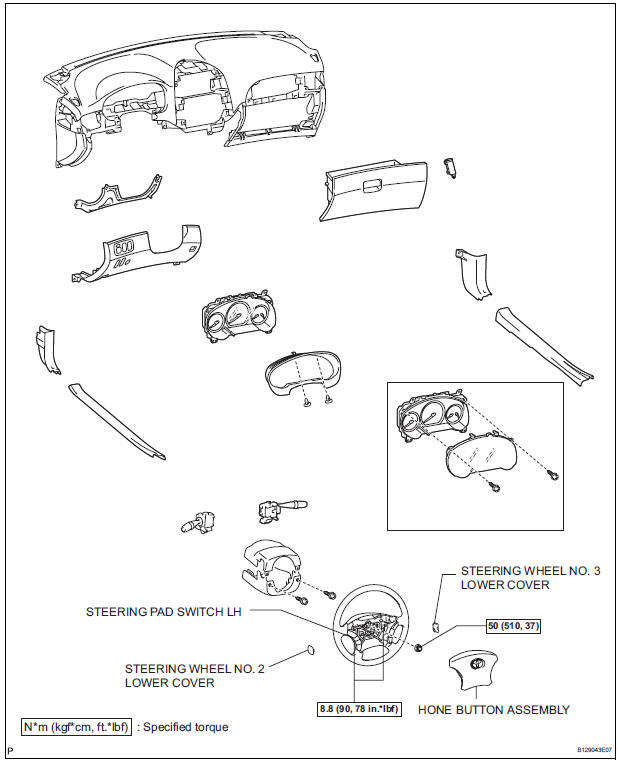
COMPONENTS
 Audio terminal
COMPONENTS
REMOVAL
1. REMOVE INSTRUMENT CLUSTER CENTER NO. 2 FINISH PANEL
Using a moulding remover, disengage the 3 clips.
Disconnect the connector and remove the
instrumen ...
 Removal
1. DISCONNECT CABLE FROM NEGATIVE BATTERY TERMINAL
2. REMOVE STEERING WHEEL NO. 2 LOWER COVER
3. REMOVE STEERING WHEEL NO. 3 LOWER COVER
4. REMOVE HONE BUTTON ASSEMBLY
5. REMOVE STEERING PAD SWITC ...
Other materials:
Installing child restraints using a seat belt (child restraint lock
function belt)
Rear facing - Infant seat/convertible seat
Place the child restraint system
on the rear seat facing
the rear of the vehicle.
Run the seat belt through the
child restraint system and
insert the plate into the
buckle. Make sure that the
belt is not twisted.
Full ...
Adjustment
HINT:
On the RH side, use the same procedures as on the LH side.
1. INSPECT SLIDE DOOR PANEL SUB-ASSEMBLY LH
Check that the clearance is within the standard
range.
Standard
2. ADJUST SLIDE DOOR PANEL SUB-ASSEMBLY LH
Using the SST, horizontally and vertically adjust the
...
Other functions
Switching between outside air and recirculated air modes
Press .
The mode switches between outside air mode (
appears on the
display) and recirculated air mode (
appears on the display) each
time the button is pressed.
Defogging the windshield
Defoggers are used to defog the windshield a ...
