
Toyota Sienna Service Manual: Terminals of ECU
1. TELEVISION CAMERA ASSEMBLY
- Disconnect the T10 camera connector
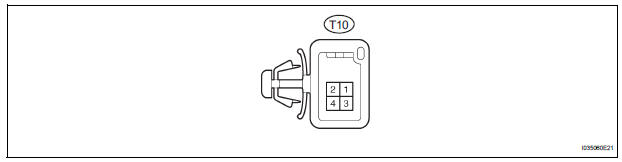
- Measure the voltage and resistance of each terminal of the wire harness side connector.

If the result is not as specified, there may be a malfunction on the wire harness side.
- Reconnect the T10 camera connector.
- Measure the voltage and frequency of each terminal of the connector.

If the result is not as specified, the camera may have a malfunction.
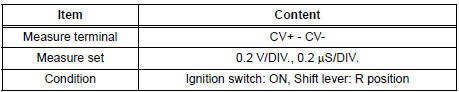
- Reference: Oscilloscope waveform
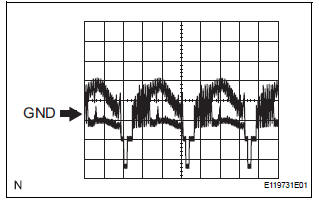
- Waveform 1
2. RADIO AND NAVIGATION ASSEMBLY
- Reverse Signal Circuit
- Display Signal Circuit between Radio and Navigation Assembly and Television Camera Assembly
 Problem symptoms table
Before inspecting the suspected areas listed in the table
below, check the fuse and relay.
Before inspecting the suspected areas listed in the table
below, check the DTCs.
Metho ...
 Reverse Signal Circuit
DESCRIPTION
The radio and navigation assembly receives a reverse signal from the
park/neutral position switch.
WIRING DIAGRAM
INSPECTION PROCEDURE
1 INSPECT RADIO AND NAVIGATION ASSEMBLY
...
Other materials:
Operation check
1. REMOVE CHECK FUNCTION
Check that the key reminder warning buzzer
sounds.
With the driver side door closed, insert the key
into the ignition key cylinder and then turn the
key to LOCK or ACC.
Check that the buzzer sounds intermittently if
the driver side door ...
Disassembly
1. REMOVE FRONT DIFFERENTIAL RING GEAR
(a) Place matchmarks on the front differential ring gear
and differential case.
(b) Remove the 14 bolts.
(c) Using a plastic hammer, tap on the front differential
ring gear to remove it from the case.
2. REMOVE FRONT DIFFERENTIAL CASE FRONT TA ...
Symptom confirmation and diagnostic trouble code
HINT:
The diagnostic system in the SIENNA has various
functions.
The first function is the Diagnostic Trouble Code
(DTC) check. A DTC is a code stored in the ECU
memory whenever a malfunction in the signal circuits
to the ECU occurs. In a DTC check, a previous
malfunction's DTC can be ...
