
Toyota Sienna Service Manual: The Other Caller's Voice cannot be Heard, is too Quiet, or Distorted
INSPECTION PROCEDURE
1 CHECK CELLULAR PHONE
- Check if the voice on the other side can be heard using a cellular phone.
OK: Voice can be heard
2 CHECK NAVIGATION SYSTEM
- Check that navigation sound can be heard from the driver side speaker.
OK: Audio sound can be heard
3 CHECK SETTINGS
- Check if the volume level is set to low on the CALL screen.
OK: The level is not set low
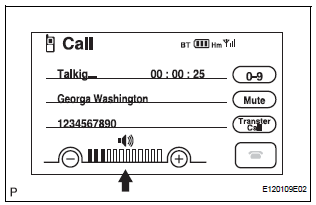
4 CHECK SETTINGS
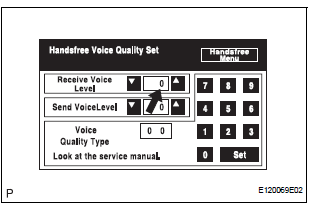
- Enter the "Handsfree Voice Quality Set" mode.
- Check if the Receive Voice Level is set to "0".
HINT: The Receive Voice Level can be set to 11 different levels, -5 to +5, with a 3 dB difference.
- Check if the Receive Voice Level is set to the minimum or maximum level.
HINT: When the Receive Voice Level is set to the minimum or maximum level, the sound may be distorted.
OK: The Receive Voice Level is set to "0".
PROCEED TO NEXT CIRCUIT INSPECTION SHOWN IN PROBLEM SYMPTOMS TABLE
 Cannot Call in a Certain Place
INSPECTION PROCEDURE
1 CHECK SURROUNDING CONDITIONS
Check if the cellular phone can make calls in a certain
place.
OK:
It can make calls
2 CHECK RECEPTION
Enter the "Informati ...
 The Other Caller cannot Hear Your Voice, or Your Voice is too Quiet or
Distorted
The Other Caller cannot Hear Your Voice, or Your Voice is too Quiet or
Distorted
INSPECTION PROCEDURE
1 CHECK CELLULAR PHONE
Check if the other side can hear your voice properly.
OK:
Your voice can be heard correctly.
2 CHECK SETTINGS
Check if the mute switch is ...
Other materials:
Engine Coolant Temperature / Intake Air Temperature
Correlation
DTC P011B Engine Coolant Temperature / Intake Air Temperature
Correlation
DESCRIPTION
The ECM calculates the difference between the readings of the coolant
temperature sensor and intake air
temperature sensor. If the difference is greater than 20C (68F), the ECM will
judge this as a malfunct ...
Terminals of ECU
1. CHECK POWER BACK DOOR ECU
Disconnect the P13 and P14 ECU connectors, and
check the voltage and resistance of each terminal of
the wire harness side connectors
If the result is not as specified, there may be a
malfunction on the wire harness side.
Reconnect the ECU co ...
Warning lights and
indicators
The warning lights and indicators on the instrument cluster and
center panel inform the driver of the status of the vehicle’s various
systems.
For the purpose of explanation, the following illustration displays
all warning lights and indicators illuminated.
Vehicles with monochrome displ ...
