
Toyota Sienna 2010-2026 Owners Manual: Using the rear view monitor system
Screen description
The rear view monitor system screen will be displayed if the shift lever is shifted to R while the engine switch is in the “ON� position (vehicles without a smart key system) or IGNITION ON mode (vehicles with a smart key system).
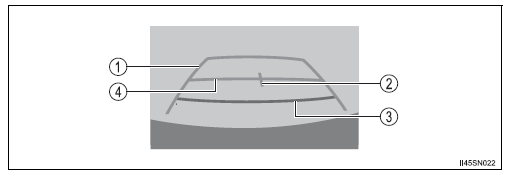
- Vehicle width guide line
The line indicates a guide path when the vehicle is being backed straight
up.
The displayed width is wider than the actual vehicle width.
- Vehicle center guide line These lines indicate the estimated vehicle center on the ground.
- Distance guide line
The line shows distance behind the vehicle, a point approximately 1.5 ft.
(0.5 m) (red) from the edge of the bumper.
- Distance guide line
The line shows distance behind the vehicle, a point approximately 3 ft.
(1 m) (blue) from the edge of the bumper.
 Rear view monitor
system
Rear view monitor
system
The rear view monitor system assists the driver by displaying an
image of the view behind the vehicle and guide lines while backing
up, for example while parking.
The screen illustrations used in t ...
 Rear view monitor system precautions
Area displayed on screen
The rear view monitor system
displays an image of the view
from the bumper of the rear
area of the vehicle.
The image on the rear view monitor system can be adjusted.
...
Other materials:
Operation check
1. CHECK WINDOW LOCK SWITCH
Check that the passenger side power window and
slide door power window operation is disabled when
the window lock switch of the power window master
switch is pressed.
Check that the passenger side power window and
slide door power windows can ...
Catalyst System Efficiency Below Threshold
MONITOR DESCRIPTION
The ECM uses the sensors mounted in front of and behind the three-way
catalyst (TWC) to monitor its
efficiency. The first sensor, an Air Fuel ratio (A/F) sensor, sends pre-catalyst
A/F ratio information to the
ECM. The second sensor, a heated oxygen sensor (O2S), sends ...
Sensor detection display, obstacle distance
Distance display
Sensors that detect an obstacle will illuminate continuously or blink.
*1: The images may differ from that shown in the illustrations.
*2: Multi-information display
*3: Audio system screen
Buzzer operation and distance to an obstacle
A buzzer sounds when the sensors are o ...
