
Toyota Sienna Service Manual: Vacuum switching valve
Components
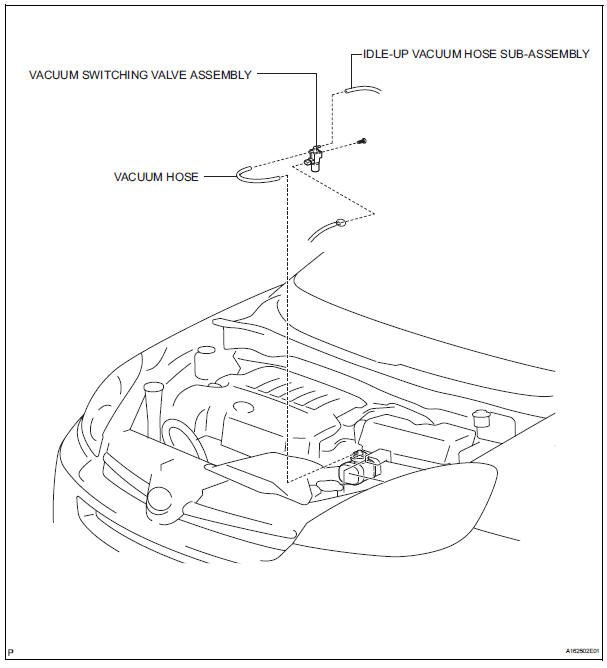
REMOVAL
1. REMOVE VACUUM SWITCHING VALVE ASSEMBLY
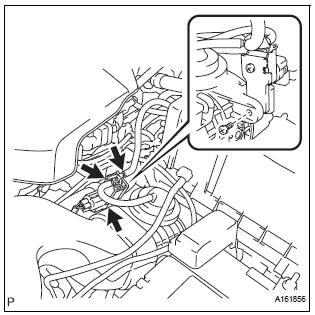
(a) Remove the 2 vacuum hoses and vacuum switching valve connector.
(b) Remove the screw and vacuum switching valve.
 Vacuum tank
On-vehicle inspection
1. Inspect air cleaner cap sub-assembly
(A) check that air flows from port b to port a.
(B) apply 60 kpa (450 mm hg, 18 in. Hg) of vacuum to
port b. Check that there is ...
 Inspection
1. V
(a) Inspect VSV operation.
(1) Using an ohmmeter, measure the resistance
according to the value(s) in the table below.V
Standard resistance
If the result is not as specified, replace t ...
Other materials:
Registration
1. REGISTRATION TRANSMITTER CODE
HINT:
The garage door opener is built in the dome lamp
assembly No.1. When transmitter codes for garage door,
gate, entry gate, door lock, home lighting system or
security system are registered with the garage door
opener, be sure to register them again wheneve ...
Distance Control ECU Power Source Circuit
DESCRIPTION
This circuit provides power to operate the distance control ECU. The distance
control ECU determines
information about the vehicle in front based on data from the laser sensor, and
then decides how much
acceleration and/or deceleration is needed to maintain the set distance. The
...
Master cylinder pressure sensor check (when using intelligent tester)
(a) Leave the vehicle in a stationary condition and
release the brake pedal for 1 second or more, and
quickly depress the brake pedal with a force of 98 N
(10 kgf, 22 lbf) or more for 1 second or more.
(b) Check the ABS warning light stays on for 3
seconds
HINT:
Ensure that the ABS warni ...
