
Toyota Sienna Service Manual: Yaw rate sensor check (when using intelligent tester)
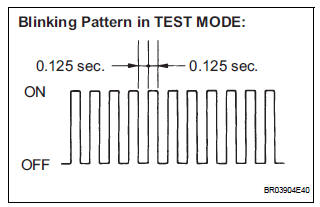
(a) Check the output of the yaw rate sensor.
(1) Move the shift lever to the D position, drive the vehicle at a speed of approximately 5 km/h (3 mph), and turn the steering wheel either to the left or right 90° or more until the vehicle makes a 180° turn.
(2) Stop the vehicle and move the shift lever to the P position. Check that the skid control buzzer sounds for 3 seconds.
HINT:
- If the skid control buzzer sounds, the signal check is completed normally.
- If the skid control buzzer does not sound, check the skid control buzzer circuit, then perform the signal check again.
- If the skid control buzzer does not sound yet, there is a malfunction in the VSC sensor, so check the DTC.
- Make 180° turn. At the end of the turn, the direction of the vehicle should be within 180° +- 5° of its start position.
- Do not spin the wheels.
6. DTC OF TEST MODE (SIGNAL CHECK) FUNCTION
ABS sensor: 
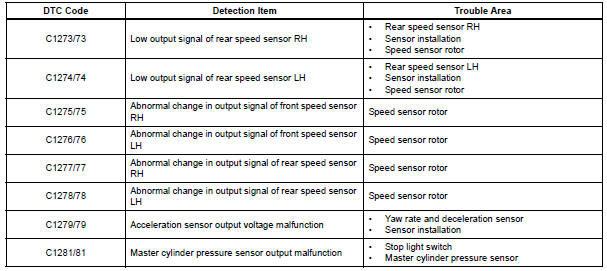
VSC sensor:
HINT: The codes in this table are output only in Test Mode (signal check).
 Speed sensor check (when using intelligent tester)
(a) Check the backward signal.
(1) Drive the vehicle in reverse for more than 1
second at 3 km/h (2 mph) or higher.
HINT:
Drive the vehicle in reverse and check the speed
sensor signal. Note th ...
 Sensor signal check by test mode (signal check) (when using sst check wire)
(a) When having replaced the skid control ECU and/or
yaw rate and deceleration sensor, perform zero
point calibration of the yaw rate and deceleration
sensor.
HINT:
If the ignition switch is t ...
Other materials:
Coolant Thermostat (Coolant Temperature
Below Thermostat Regulating Temperature)
DTC P0128 Coolant Thermostat (Coolant Temperature
Below Thermostat Regulating Temperature)
HINT:
This DTC relates to the thermostat.
DESCRIPTION
This DTC is set when the Engine Coolant Temperature (ECT) does not reach 75C
(167F) despite
sufficient engine warm-up time
DTC No.
...
Mass or Volume Air Flow Circuit Range / Performance Problem
DESCRIPTION
Refer to DTC P0100 (See page ES-116).
MONITOR DESCRIPTION
The MAF meter is a sensor that measures the amount of air flowing through the
throttle valve. The ECM
uses this information to determine the fuel injection time and to provide an
appropriate air-fuel ratio.
Insi ...
Installation
1. INSTALL FRONT PASSENGER AIRBAG ASSEMBLY
Install the front passenger airbag assembly with the
2 screws.
2. INSTALL INSTRUMENT PANEL SUB-ASSEMBLY
3. CONNECT FRONT PASSENGER AIRBAG ASSEMBLY CONNECTOR
Connect the connector to the front passenger airbag
assembly.
...
