
Toyota Sienna 2010-2026 Owners Manual: Screen for audio settings
- Press the “SETUP� button.
- Select “Audio� on the “Setup� screen.
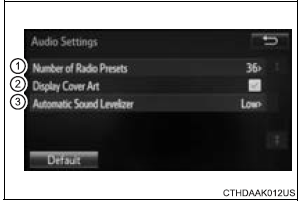
- Number of Radio Presets Select the number of radio preset stations.
- Display Cover Art on/off
- Automatic Sound Levelizer
 Audio settings
Settings are available for adjusting the radio operation, cover
art, etc. ...
 Automatic sound leveliser (ASL)
Select “Automatic Sound Levelizer�.
Select “High�, “Mid�, “Low� or “Off�.
About Automatic Sound Leveliser (ASL)
ASL automatically adjusts the volume and tone quality accor ...
Other materials:
Installation
1. INSTALL SLIDING ROOF HOUSING ASSEMBLY
Install the housing with the 6 nuts.
Install the 4 brackets with the 8 bolts.
Connect the 4 hoses and drive gear connector.
2. ADJUST SLIDING ROOF GLASS SUB-ASSEMBLY
Check for a difference in levels between the sliding
roof (roof glass) a ...
Steering Pad Switch Circuit
DESCRIPTION
This circuit sends an operation signal from the steering pad switch to the
radio receiver.
If there is an open in the circuit, the audio system cannot be operated using
the steering pad switch.
If there is a short in the circuit, the same condition as that when the switch
is ...
Adjustment
HINT:
If the malfunction does not disappear by following the
procedure in ADJUSTMENT and the rear No. 2 seat
assembly needs to be replaced, do not disassemble the rear
No. 2 seat assembly.
1. ADJUST FRONT LEG
HINT:
Perform the following procedure if the inner leg does not
lock.
P ...
