
Toyota Sienna 2010-2026 Owners Manual: Receiving a message
When an e-mail/SMS/MMS is received, the incoming message screen pops up with sound and is ready to be operated on the screen.
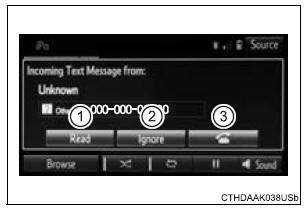
- Select to check the message.
- Select to refuse the message.
- Select to call the message sender.
Receiving a message
- Depending on the cellular phone used for receiving messages, or its registration status with the audio system, some information may not be displayed.
- The pop up screen is separately available for incoming e-mail and SMS/ MMS messages under the following conditions:
E-mail:
- “Incoming E-mail Display� is set to “Full Screen�.
- “E-mail Notification Popup� is set to on.
SMS/MMS:
- “Incoming SMS/MMS Display� is set to “Full screen�.
- “SMS/MMS Notification Popup� is set to on.
 Bluetooth® phone
message function
Bluetooth® phone
message function
Received messages can be forwarded from the connected
Bluetooth® phone, enabling checking and replying using the
audio system.
Depending on the type of Bluetooth® phone connected, received
mes ...
 Checking the messages
Display the message inbox screen.
Select the desired message from the list.
Check that the message is displayed.
E-mails: Select “Mark
Unread� or “Mark Read� to
mark mail ...
Other materials:
Disassembly
1. REMOVE REAR DIFFERENTIAL CARRIER COVER
(a) Remove the 8 bolts from the carrier cover.
(b) Using a brass bar and a hammer, separate the
carrier cover from rear differential carrier assembly.
(c) Remove the breather plug from the rear differential
carrier cover.
(d) Remove the bol ...
Inspection
1. INSPECT MAGNETIC CLUTCH CLEARANCE
(a) Set the dial indicator to the magnetic clutch hub.
(b) Connect the battery positive lead to the terminal 1 of
the magnet clutch connector and the negative lead
to the earth wire. Turn on and off the magnetic
clutch and measure the clearance.
Stand ...
Disassembly
1. REMOVE PARKING BRAKE PEDAL BRACKET PROTECTOR
(a) Using a flat-head screwdriver, disengage the 2
claws on the parking brake pedal bracket protector.
(b) Turning the parking brake pedal bracket protector
clockwise, remove the parking brake pedal bracket
protector from the parking brake ...
