
Toyota Sienna 2010-2026 Owners Manual: Changing the engine switch positions
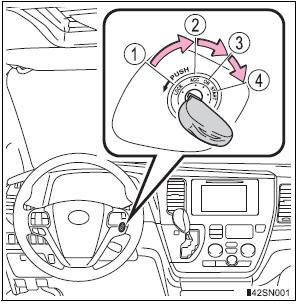
- “LOCK�
The steering wheel is locked and the key can be removed. (The key can be removed only when the shift lever is in “P�.) - “ACC�
Some electrical components such as the audio system can be used. - “ON�
All electrical components can be used. - “START�
For starting the engine.
Turning the key from “ACC� to “LOCK�
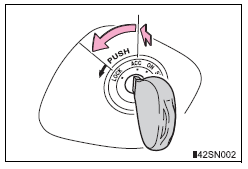
- Shift the shift lever to P.
- Push in the key and turn it to the “LOCK� position.
If the engine does not start
The engine immobilizer system may not have been deactivated. Contact your Toyota dealer.
When the steering lock cannot be released
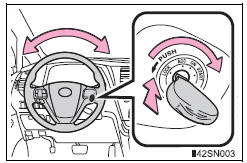
When starting the engine, the engine switch may seem stuck in the “LOCK� position. To free it, turn the key while turning the steering wheel slightly left and right.
Key reminder function
A buzzer sounds if the driver’s door is opened while the engine switch is in the “LOCK� or “ACC� position to remind you to remove the key.
| WARNING When starting the engine Always start the engine while sitting in the driver’s seat. Do not depress the accelerator pedal while starting the engine under any circumstances. Doing so may cause an accident resulting in death or serious injury. Caution when driving Do not turn the engine switch to the “LOCK� position while driving. If, in an emergency, you must turn the engine off while the vehicle is moving, turn the engine switch only to the “ACC� position to stop the engine. An accident may result if the engine is stopped while driving. |
| NOTICE To prevent battery discharge Do not leave the engine switch in the “ACC� or “ON� position for long periods of time without the engine running. When starting the engine
|
 Starting the engine
Check that the parking brake is set.
Check that the shift lever is set in P.
Firmly depress the brake pedal.
Turn the engine switch to the “START� position to start the engine.
...
 Engine (ignition) switch
(vehicles with a smart
key system)
Engine (ignition) switch
(vehicles with a smart
key system)
Performing the following operations when carrying the electronic
key on your person starts the engine or changes engine
switch modes. ...
Other materials:
Summary of the Blind Spot Monitor
The Blind Spot Monitor is a system that has 2 functions:
The Blind Spot Monitor function
Assists the driver in making the decision when changing lanes
The Rear Cross Traffic Alert function
Assists the driver when backing up
These functions use same sensors.
BSM main switch
Pre ...
Sensor detection display, obstacle distance
Distance display
Sensors that detect an obstacle will illuminate continuously or blink.
*1: The images may differ from that shown in the illustrations.
*2: Multi-information display
*3: Audio system screen
Buzzer operation and distance to an obstacle
A buzzer sounds when the sensors are o ...
What to do if... (Troubleshooting)
If there is a problem with the hands-free system or a Bluetooth®
device, first check the table below.
When using the hands-free system with a Bluetooth® device
The hands-free system or Bluetooth® device does not
work.
The connected device may not be a compatible Bl ...
