
Toyota Sienna Service Manual: Check mode procedure
1. CHECK MODE (SIGNAL CHECK): DTC CHECK
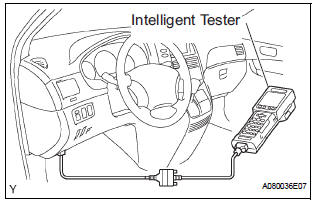
- Connect the intelligent tester to the DLC3.
- ) Turn the ignition switch to the ON position.
- ) Select the "SIGNAL CHECK", and proceed checking using the intelligent tester.
NOTICE: Select the "SIGNAL CHECK" from the "DTC CHECK" screen displayed on the intelligent tester to clear the output DTCs (both present and past).
HINT:
- DTCs can be detected more sensitively in check mode than in normal diagnosis mode.
- Perform check mode inspection when a malfunction in each squib circuit is suspected even after the normal system code is output through normal diagnosis mode inspection.
 DTC check / clear
1. DTC CHECK (USING SST CHECK WIRE)
Check the DTCs (Present trouble code).
Turn the ignition switch ON, and wait for
approximately 60 seconds.
Using SST, connect terminal ...
 Data list / active test
HINT:
By accessing the DATA LIST displayed on the intelligent
tester, you can perform such functions as reading the values
of switches and sensors without removing any parts. Reading
the DATA LIST ...
Other materials:
Selecting trailer ball
Use the correct trailer ball for your application.
Trailer ball load rating
Matches or exceeds the gross
trailer weight rating of the trailer.
Ball diameter
Matches the size of the trailer coupler.
Most couplers are stamped
with the required trailer ball size.
Shank len ...
Side Airbag Sensor Assembly LH Circuit Malfunction
DTC B1141/33 Side Airbag Sensor Assembly LH Circuit Malfunction
DESCRIPTION
The side airbag sensor LH circuit consists of the center airbag sensor
assembly and side airbag sensor
LH.
If the center airbag sensor assembly receives signals from the side airbag
sensor LH, it judges whether or
...
Problem symptoms table
POWER BACK DOOR SYSTEM
Symptom
Suspected Area
Power back door does not operate when switch* is
pressed (* Switch indicates the satellite switch for
power back door)
ECU-B fuse
Power back door main switch
Satellite switch
Power back door tou ...
