
Toyota Sienna 2010-2026 Owners Manual: Deactivating or stopping the alarm
Do one of the following to deactivate or stop the alarm:
- Unlock the doors using the entry function (vehicles with a smart key system) or wireless remote control.
- Vehicles without a smart key system: Turn the engine switch to the
“ACC� or “ON� position, or start the engine.
Vehicles with a smart key system: Turn the engine switch to ACCESSORY or IGNITION ON mode, or start the engine.
(The alarm will be deactivated or stopped after a few seconds.)
System maintenance
The vehicle has a maintenance-free type alarm system.
Items to check before locking the vehicle
To prevent unexpected triggering of the alarm and vehicle theft, make sure of the following:
- Nobody is in the vehicle.
- The windows and moon roof (if equipped) are closed before the alarm is set.
- No valuables or other personal items are left in the vehicle.
Triggering of the alarm
The alarm may be triggered in the following situations.
(Stopping the alarm deactivates the alarm system.)
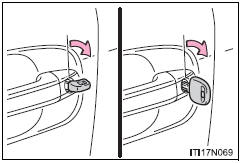
- The doors are unlocked using the key.
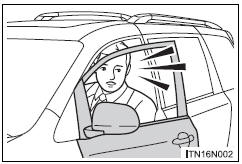
- A person inside the vehicle opens a door or hood.
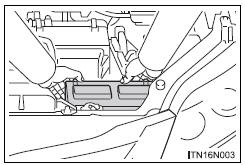
- The battery is recharged or replaced when the vehicle is locked. (
Alarm-operated door lock
In the following cases, depending on the situations, the door may automatically lock to prevent improper entry into the vehicle:
- When a person left in the vehicle triggers the alarm by unlocking a door or the back door.
- When a person left in the vehicle unlocks a door or the back door while the alarm is operating.
- When recharging or replacing the battery.
| NOTICE To ensure the system operates correctly Do not modify or remove the system. If modified or removed, the proper operation of the system cannot be guaranteed. |
 Setting the alarm system
Close the doors and hood, and
lock all the doors using the entry
function or wireless remote control.
The system will be set automatically
after 30 seconds.
The indicator light changes fr ...

Other materials:
CD-ROM Abnormal/ CD-ROM Abnormal
DTC 62-43 CD-ROM Abnormal
DTC 63-43 CD-ROM Abnormal
DESCRIPTION
DTC No.
DTC Detecting Condition
Trouble Area
62-43
CD-ROM operation is abnormal
CD
Radio receiver
63-43
CD-ROM operation is abnormal
INSPECTION PROCEDURE
HIN ...
Rear Speed Sensor RH Circuit
DESCRIPTION
Refer to DTCs C0200/31, C0205/32, C1235/35, and C1236/36 (See page BC-17).
DTCs C1273/73 to C1278/78 can be deleted when the speed sensor sends a vehicle
speed signal or the
Test Mode ends. DTCs C1273/73 to C1278/78 are output only in the Test Mode.
HINT:
DTC C0210/33 ...
Terminals of ECU
1. CHECK POWER BACK DOOR ECU
Disconnect the P13 and P14 ECU connectors, and
check the voltage and resistance of each terminal of
the wire harness side connectors
If the result is not as specified, there may be a
malfunction on the wire harness side.
Reconnect the ECU co ...
