
Toyota Sienna Service Manual: Disassembly
1. REMOVE LOWER BALL JOINT ASSEMBLY FRONT LH
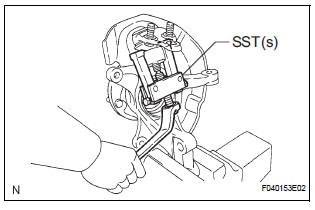
(a) Remove the cotter pin and nut.
(b) Using SST(s), remove the lower ball joint assembly front LH.
SST 09628-62011
2. REMOVE FRONT WHEEL BEARING DUST DEFLECTOR NO.1 LH
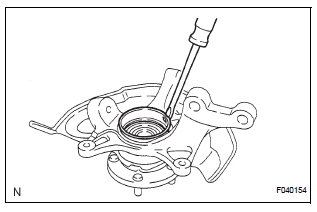
(a) Using a screwdriver, remove the bearing dust deflector NO. 1 LH.
3. REMOVE FRONT AXLE HUB LH HOLE SNAP RING
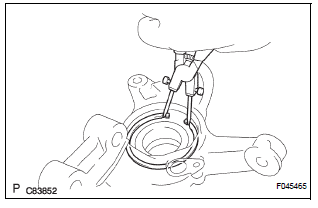
(a) Using snap ring pliers, remove the front axle hub LH hole snap ring.
4. REMOVE FRONT AXLE ASSEMBLY LH
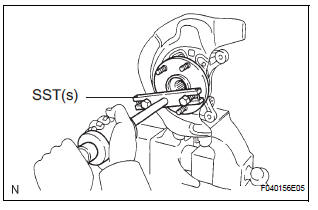
(a) Using SST(s), remove the front axle hub subassembly LH.
SST 09520-00031
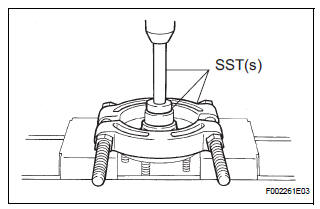
(b) Using SST(s) and a press, remove the bearing inner race (outside) from the front axle hub sub-assembly LH.
SST 09950-00020, 09950-60010 (09951-00430), 09950-70010 (09951-07100)
5. REMOVE DISC BRAKE DUST COVER FRONT LH
(a) Using a torx wrench (T30), remove the 4 bolts and disc brake dust cover front LH.
HINT: Torx is a registered trademark of Textron Inc.
6. REMOVE FRONT AXLE HUB LH BEARING
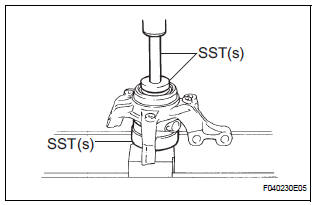
(a) Place the bearing inner race (outside) on the front axle hub LH bearing.
(b) Using SST(s) and a press, press the front axle hub LH bearing until it contacts the SST(s).
SST 09527-17011, 09950-60010 (09951-00600), 09950-70010 (09951-07100)
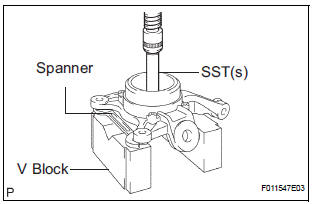
(c) Using a spanner to make the steering knuckle LH horizontal, fix it to the V block, as shown in the illustration.
NOTICE: Be sure the steering knuckle is horizontally positioned.
(d) Using SST(s) and a press, remove the front axle hub LH bearing.
SST 09950-60010 (09951-00600), 09950-70010 (09951-07100)
 Removal
HINT:
Replace the RH side using the same procedures as for the
LH side.
1. REMOVE FRONT WHEEL
2. REMOVE FRONT AXLE HUB LH NUT (See page DS-
5)
3. SEPARATE SPEED SENSOR FRONT LH (See page
DS-5)
...
 Reassembly
1. INSTALL FRONT AXLE HUB LH BEARING
(a) Using SST(s) and a press, install a new front axle
hub LH bearing to the steering knuckle LH.
SST 09950-60020 (09951-00810), 09950-70010
(09951-07100 ...
Other materials:
Reassembly
1. INSTALL BRAKE MASTER LESS RESERVOIR TANK CYLINDER SUB-ASSEMBLY
(a) Apply lithium soap base glycol grease to the 2 brake
master cylinder union grommets and install them to
the brake master less reservoir tank cylinder subassembly.
(b) Using a pin punch (φ 5 mm) and hammer, install the
...
Camera Picture Error
DTC 5C-40 Camera Picture Error
DESCRIPTION
DTC No.
DTC Detection Condition
Trouble Area
5C-40
Synchronous signal from the camera cannot be
transmitted.
Wire harness
Television camera assembly
Radio and navigation assembly
...
Vehicle Speed Sensor Malfunction
DTC P0500 Vehicle Speed Sensor Malfunction
DTC P0503 Vehicle Speed Sensor "A" Intermittent / Erratic /
High
DESCRIPTION
The cruise control system uses the same vehicle speed signal that is sent to the
ECM for the SFI system.
If DTC P0500 is detected, perform the diagnosis using th ...
