
Toyota Sienna 2010-2026 Owners Manual: Driving position memory
Your preferred driving position (the position of the driver’s seat and outside rear view mirrors) can be recalled by pressing a button.
Two different driving positions can be recorded into memory.
Recording procedure
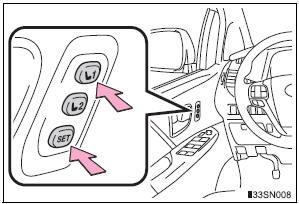
- Check that the shift lever is in P.
- Turn the engine switch to IGNITION ON mode.
- Adjust the driver’s seat and outside rear view mirrors to the desired positions.
- While pressing the “SET�
button, or within 3 seconds
after the “SET� button is
pressed, press button “1� or
“2� until the signal beeps.
If the selected button has already been preset, the previously recorded position will be overwritten.
Recall procedure
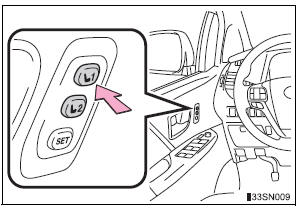
- Check that the shift lever is in P.
- Turn the engine switch to IGNITION ON mode.
- Press one of the buttons for the driving position you want to recall until the signal beeps.
To stop the position recall operation part-way through
Perform any of the following:
- Press the “SET� button.
- Press button “1� or “2�.
- Operate any of the seat adjustment switches (only cancels seat position recall).
Operating the driving position memory after turning the engine switch off
Recorded seat positions can be activated up to 180 seconds after the driver’s door is opened and another 60 seconds after it is closed again.
In order to correctly use the driving position memory function
If a seat position is already in the furthest possible position and the seat is operated in the same direction, the recorded position may be slightly different when it is recalled.
 Power easy access system
The seat is automatically adjusted to allow the driver to enter and exit
the vehicle easily.
When all of the following have
been performed, the driver’s seat
is automatically adjusted to a
po ...
 Memory recall function
Each electronic key can be registered to recall your preferred driving
position.
Registering procedure
Record your driving position to button “1� or “2� before performing
the following:
C ...
Other materials:
Rear Door ECU RH Communication Stop
DTC B1216 Rear Door ECU RH Communication Stop
DESCRIPTION
DTC B1216 is output when communication between the power slide door ECU RH
and the multiplex
network gateway ECU stops for more than 10 seconds.
DTC No.
DTC Detection Condition
Trouble Area
B1216
...
Installation
1. INSTALL SLIDING ROOF HOUSING ASSEMBLY
Install the housing with the 6 nuts.
Install the 4 brackets with the 8 bolts.
Connect the 4 hoses and drive gear connector.
2. ADJUST SLIDING ROOF GLASS SUB-ASSEMBLY
Check for a difference in levels between the sliding
roof (roof glass) a ...
Installation
1. INSTALL 3 POINT TYPE NO. 2 REAR SEAT BELT ASSEMBLY
Check the degree of tilt when the belt begins to lock
the ELR.
Check that the belt does not lock within 15 of
tilt in all directions but that the belt locks with
over 45 of tilt, when gently moving the
retractor. ...
