
Toyota Sienna 2010-2026 Owners Manual: Gauges and meters
The displayed content may differ depending on the type of meter.
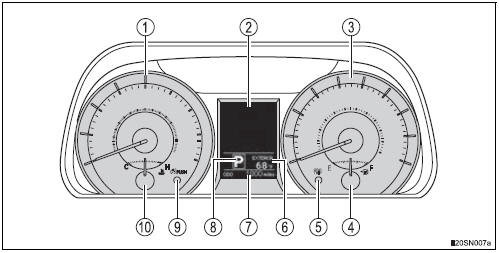
- Vehicles with monochrome display
- Vehicles with color display
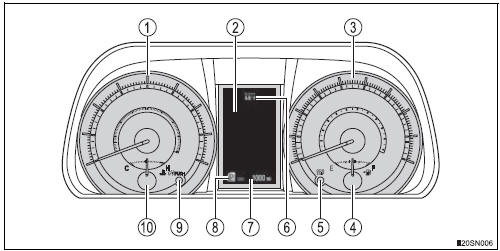
- Tachometer
Displays the engine speed in revolutions per minute - Multi-information display Presents the driver with a variety of driving-related data
- Speedometer
Displays the vehicle speed - Fuel gauge
Displays the quantity of fuel remaining in the tan - Odometer/trip meter display change button
- Outside temperature
- Odometer and trip meter display
Odometer:
Displays the total distance that the vehicle has been driven Trip meter:
Displays the distance the vehicle has been driven since the meter was last reset. Trip meters “A� and “B� can be used to record and display different distances independently. - Shift position and range
- Meter panel lights control button
- Engine coolant temperature gauge Displays the engine coolant temperature
 Indicators
The indicators inform the driver of the operating state of the vehicle’s
various systems.
*1: If equipped
*2: These lights turn on when the engine switch is turned to the “ON� positio ...
 Changing the trip meter display
Pressing this button switches
among the odometer, trip meter
“A� and trip meter “B� displays.
When the trip meter is displayed,
pressing and holding the button
will reset the trip m ...
Other materials:
Installation
1. INSTALL FRONT DOOR GLASS WEATHERSTRIP
Install the front door grass weatherstrip.
2. INSTALL OUTER REAR VIEW MIRROR ASSEMBLY
(See page MI-45)
3. INSTALL FRONT DOOR TRIM BOARD SUBASSEMBLY
4. INSTALL POWER WINDOW REGULATOR MASTER
SWITCH ASSEMBLY
5. INSTALL BACK FRAME PLATE
6. INSTALL FR ...
Removal
1. PRECAUTION
CAUTION:
Be sure to read "PRECAUTION" thoroughly before
servicing.
2. DISCONNECT CABLE FROM NEGATIVE BATTERY
TERMINAL
CAUTION:
Wait for 90 seconds after disconnecting the cable to
prevent the airbag working.
3. REMOVE FRONT SEAT ASSEMBLY (for Manual Seat)
4. REMOVE ...
Third outside seats
To use
Pull the head restraints up.
To fold
Press the button
Removing the head restraints
Front and second outside seats
Pull the head restraint up while pressing
the lock release button.
Second center* and third center seats
Pull the head restraint up while pressi ...
