
Toyota Sienna Service Manual: Initialization
1. ZERO POINT CALIBRATION
NOTICE: Make sure that the front passenger seat is not occupied before performing the operation. HINT: Perform the zero point calibration and sensitivity check if any of the following conditions occur.
- The occupant classification ECU is replaced.
- Accessories (seatback tray and seat cover, etc.) are installed.
- The front passenger seat is removed from the vehicle.
- The passenger airbag ON/OFF indicator ("OFF") comes on when the front passenger seat is not occupied.
- The vehicle is brought to the workshop for repair due to an accident or a collision.
- Zero point calibration and sensitivity check procedures
HINT: Make sure that zero point calibration has finished normally, and then perform the sensitivity check.
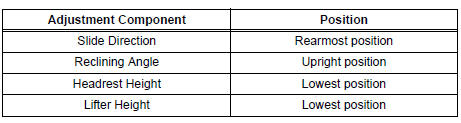
- Adjust the seat position according to the table below.
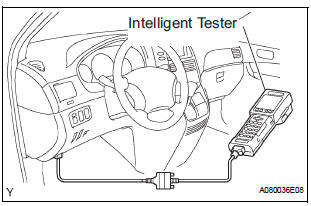
- Connect the intelligent tester to the DLC3.
- Turn the ignition switch to the ON position.
- Perform the zero point calibration by following the prompts on the tester screen.
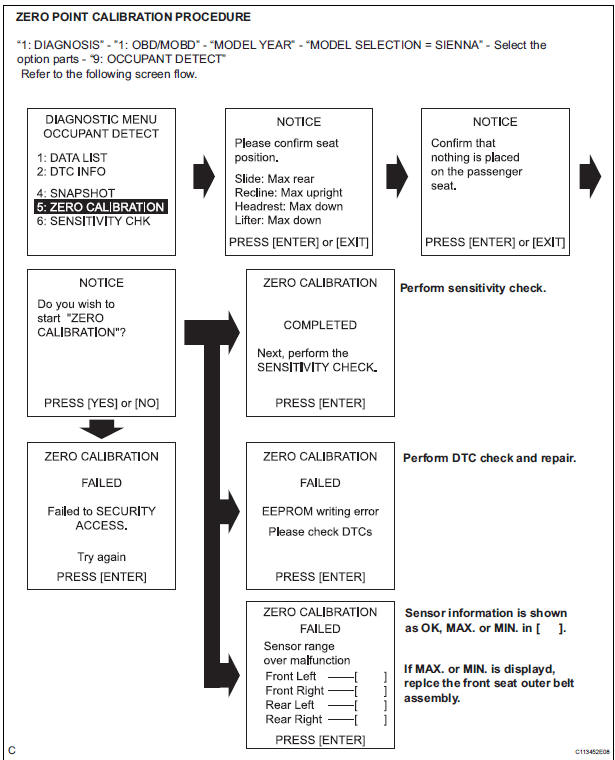
HINT: Refer to the intelligent tester operator's manual for further details
OK: "COMPLETE" is displayed.
- Perform the sensitivity check by following the prompts on the tester screen.
- Confirm that the beginning sensor reading is
within the standard range.
Standard value: -3.2 to 3.2 kg (-7 to 7 lb)
- Place a 30 kg (66.14 lb) weight (eg. a 30 kg (66.14 lb) of lead mass) onto the front passenger seat.
- Confirm that the sensitivity is within the standard range.
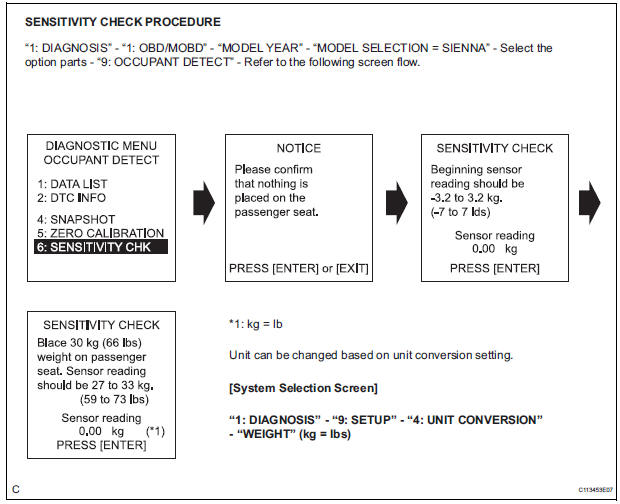
Standard value: 27 to 33 kg (59.52 to 72.75 lb)
HINT:
- When performing the sensitivity check, use a solid metal weight (the check result may not appear properly if a liquid weight is used).
- If the sensitivity deviates from the standard range, retighten the bolts of the front passenger seat taking care not to deform the seat rail. After performing this procedure, if the sensitivity is not within the standard range, replace the front seat assembly RH.
- If zero point calibration has not finished normally, replace the front seat assembly RH.
Problem symptoms table
HINT: Proceed to the troubleshooting for each circuit in the table below.
Occupant Classification System
|
Symptom |
Suspected area |
| The front passenger seat condition differs from the indication by the passenger airbag ON/OFF indicator (DTC is not output). | Trouble in Passenger Airbag ON/OFF Indicator |
 How to proceed with
troubleshooting
How to proceed with
troubleshooting
The intelligent tester can be used in steps 4, 6, 8 and 9.
1 VEHICLE BROUGHT TO WORKSHOP
2 CUSTOMER PROBLEM ANALYSIS
3 PASSENGER AIRBAG ON/OFF INDICATOR CHECK
4 DTCs CHECK (Present and Past ...
 Terminals of ECU
1. OCCUPANT CLASSIFICATION ECU
...
Other materials:
Inspection
1. INSPECT SHOCK ABSORBER ASSEMBLY FRONT LH
(a) Compress and extend the shock absorber rod and
check that there is no unusual resistance or unusual
sound during operation.
If there is any abnormality, replace the shock
absorber assembly front LH with a new one.
NOTICE:
When disposing of ...
Cooling fan ecu
ON-VEHICLE INSPECTION
1. INSPECT COOLING FAN ECU
(a) Inspect the input voltage.
(1) Disconnect the cooling fan ECU connector.
(2) Turn the ignition switch to the ON position.
Check the voltage of the +B terminal of the
disconnected wire harness side connector.
Standard voltage:
9 t ...
Removal
1. REMOVE INSTRUMENT PANEL SAFETY PAD SUBASSEMBLY
2. REMOVE ANTENNA CORD SUB-ASSEMBLY
Replace the 5 clamps and remove the antenna cord
sub-assembly.
3. REMOVE PULL TOP ANTENNA POLE SUBASSEMBLY
4. REMOVE ANTENNA ORNAMENT
Remove the antenna ornament.
5. REMOVE ANTENNA ASS ...
