
Toyota Sienna Service Manual: Open in Occupant Classification ECU Battery Positive Line
DTC B1794 Open in Occupant Classification ECU Battery Positive Line
DESCRIPTION
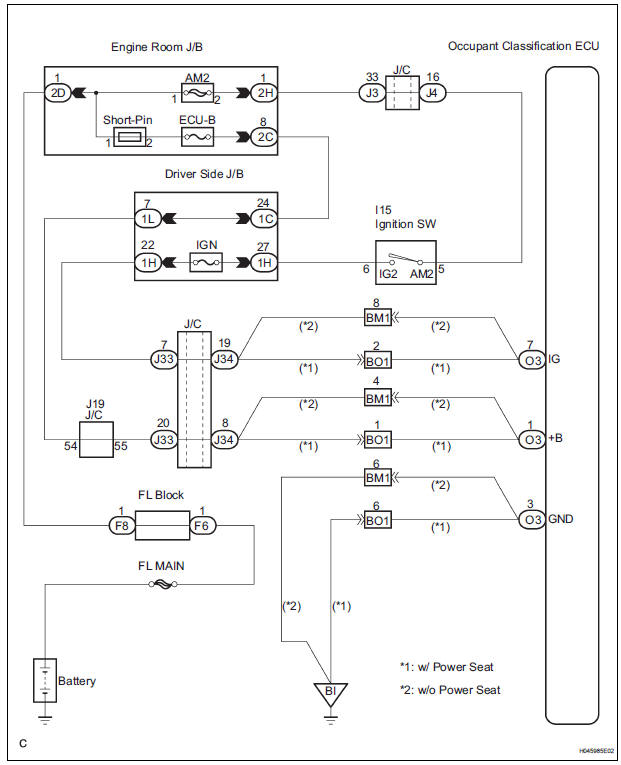
This circuit consists of the occupant classification ECU and the power source circuit (battery, fuse, wire harness).
DTC B1794 is recorded when a malfunction is detected in the occupant classification ECU or the power source circuit.
HINT: When DTC B1794 is output after switching the ignition switch LOCK-ON-LOCK 50 times in a row when a malfunction occurs in the power circuit for the occupant classification system, the DTC is output again when a malfunction is detected even once after being cleared, unless the normal system code is
|
DTC No. |
DTC Detecting Condition |
Trouble Area |
|
B1794 |
|
|
WIRING DIAGRAM
INSPECTION PROCEDURE
1 CHECK BATTERY
- Measure the voltage of the battery.
Standard: 11 to 14 V
2 CHECK FUSE
- Check the ECU-B fuse.
Standard: Below 1 Ω
3 CHECK WIRE HARNESS
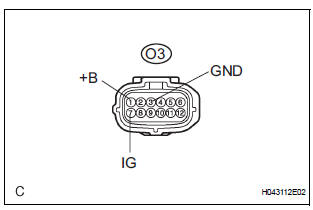
- Turn the ignition switch to the LOCK position.
- Disconnect the negative (-) terminal cable from the battery, and wait for at least 90 seconds.
- Disconnect the connector from the occupant classification ECU.
- Connect the negative (-) terminal cable to the battery.
- Turn the ignition switch to the ON position.
- Measure the voltage and resistance according to the value(s) in the table below.
Standard voltage

- Turn the ignition switch to the LOCK position.
- Measure the resistance and resistance according to the value(s) in the table below.
Standard resistance

4 CHECK DTC
- Turn the ignition switch to the ON position.
(b) Clear the DTCs stored in memory (35).
HINT: First clear DTCs stored in the occupant classification ECU and then in the center airbag sensor assembly.
- Turn the ignition switch to the LOCK position.
- Turn the ignition switch to the ON position, and wait for at least 10 seconds.
- Using the intelligent tester, check the DTCs of the occupant classification ECU (35).
OK: DTC B1794 is not output. HINT: Codes other than code B1794 may be output at this time, but they are not related to this check.
USE SIMULATION METHOD TO CHECK
5 REPLACE OCCUPANT CLASSIFICATION ECU
- Turn the ignition switch to the LOCK position.
- Disconnect the negative (-) terminal cable from the battery, and wait for at least 90 seconds.
- Replace the occupant classification ECU
6 PERFORM ZERO POINT CALIBRATION
- Connect the negative (-) terminal cable to the battery.
- Connect the intelligent tester to the DLC3.
- Turn the ignition switch to the ON position.
- Using the intelligent tester, perform the "Zero point calibration" (28).
OK: The "COMPLETED" is displayed.
7 PERFORM SENSITIVITY CHECK
- Using the intelligent tester, perform the "Sensitivity check"
Standard value: 27 to 33 kg (59.52 to 72.75 lb)
END
 Occupant Classification Sensor Power Supply
Circuit Malfunction
Occupant Classification Sensor Power Supply
Circuit Malfunction
DTC B1793 Occupant Classification Sensor Power Supply
Circuit Malfunction
DESCRIPTION
The occupant classification sensor power supply circuit consists of the
occupant classification ECU and
the ...
 Occupant Classification ECU Malfunction
DTC B1795 Occupant Classification ECU Malfunction
DESCRIPTION
DTC B1795 is recorded when a malfunction is detected in the occupant
classification ECU.
Troubleshoot DTC B1771 first when the DTCs ...
Other materials:
ECM Communication Stop Mode
DESCRIPTION
Detection Item
Symptom
Trouble Area
ECM Communication Stop
Mode
"Engine" is not displayed on the "Communication
Bus Check" screen of the intelligent tester
Applies to "ECM Communication Stop Mode" in ...
Installation
1. INSTALL THROTTLE BODY
(a) Install a new throttle body gasket to the intake air
surge tank.
(b) Install the throttle body with the 4 bolts.
Torque: 10 N*m (102 kgf*cm, 7 ft.*lbf)
(c) Connect the 2 water by-pass hoses.
(d) Connect the throttle body connector and clamp.
2. INSTA ...
Washer Signal Circuit
DESCRIPTION
The distance control ECU detects washer operation. The cruise control will be
cancelled by the distance
control ECU if the windshield wipers operate in the HI or LO mode. By detecting
washer operation, the
distance control ECU allows the cruise control to continue even when the
...
