
Toyota Sienna Service Manual: Precaution
1. SRS AIRBAG SYSTEM HANDLING PRECAUTIONS
- This vehicle is equipped with an SRS (Supplemental Restraint System) such as the driver airbag and front passenger airbag. Failure to carry out service operations in the correct sequence could cause unexpected SRS deployment during servicing and may lead to a serious accident. Before servicing (including installation / removal, inspection and replacement of parts), be sure to read the precautionary notice for the Supplemental Restraint System (See page RS-1).
2. WIRE HARNESS REPAIR
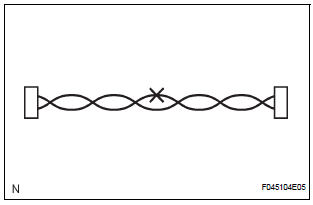
- After repairing wire harness, wrap the repaired part with a vinyl tape.
NOTICE:
- The CANL wire harness and CANH wire harness must be installed together all the time. When installing, make sure to twist them.
- The difference in the length of the CANL wire harness and CANH wire harness should be within 100 mm (3.937 in.).
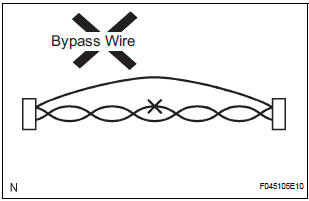
- Do not perform the bypass wiring between the connectors.
NOTICE: If you perform the bypass wiring, the characteristic of the twisted wire harness will be lost.
3. CONNECTOR HANDLING
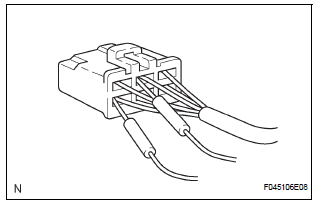
- When inserting tester probes into a connector, insert them from the rear of the connector.
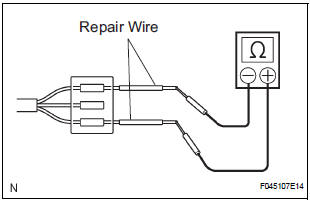
- If it is impossible to check resistance from the back of the connector, use a repair wire to check it.

 Parts location
SYSTEM DIAGRAM
...
Other materials:
Suspension system
How to proceed with troubleshooting
HINT:
This is the repair procedure for vehicle pull.
Problem symptoms table
FRONT SUSPENSION SYSTEM
REAR SUSPENSION SYSTEM
...
Active Control Engine Mount System
DESCRIPTION
LOCATION
The Active Control Engine Mount (ACM) system decreases engine vibration at
engine idling using the
ACM VSV. The VSV is controlled by a pulse signal transmitted to the VSV from the
ECM. The frequency
of this pulse signal is matched to the engine speed to decrease engine ...
Removal
HINT:
On the RH side, use the same procedures as on the LH side.
1. REMOVE SLIDE DOOR
Remove the rear door scuff plate (See page IR-7).
Remove the back door scuff plate (See page ED-
214).
Remove the quarter trim panel (See page IR-9).
Remove the upper rail cushion from the rail up ...
