
Toyota Sienna Service Manual: Removal
1. DRAIN POWER STEERING FLUID
2. REMOVE FRONT WHEEL RH
3. REMOVE FRONT FENDER APRON SEAL RH (See page EM-26)
4. REMOVE FAN AND GENERATOR V BELT (See page EM-6)
5. DISCONNECT NO. 1 FLUID RESERVOIR TO PUMP HOSE
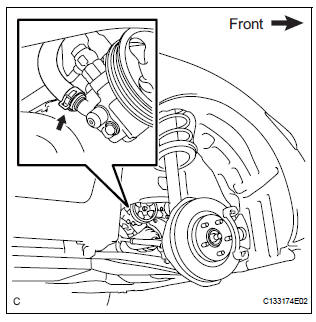
(a) Slide the clip and disconnect the No. 1 fluid reservoir to pump hose from the vane pump assembly.
6. DISCONNECT PRESSURE FEED TUBE ASSEMBLY
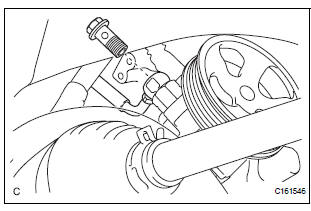
(a) Remove the union bolt and disconnect the pressure feed tube assembly from the vane pump assembly.
(b) Remove the gasket from the pressure feed tube assembly.
7. DISCONNECT POWER STEERING FLUID PRESSURE SWITCH CONNECTOR
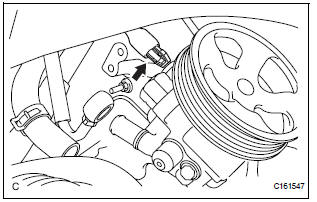
(a) Disconnect the power steering fluid pressure switch connector.
8. REMOVE VANE PUMP ASSEMBLY
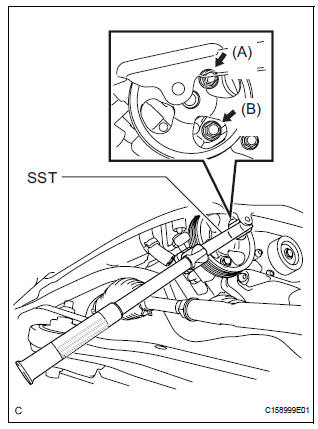
(a) Using SST, loosen bolt (A) and remove bolt (B), and then remove the vane pump assembly.
SST 09249-63010
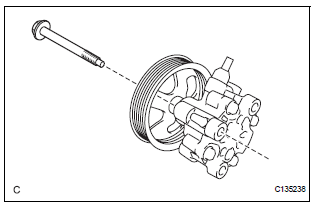
(b) Remove the bolt from the vane pump assembly.
 Vane pump
COMPONENTS
...
 Disassembly
1. HOLD VANE PUMP ASSEMBLY
(a) Using SST, hold the vane pump assembly in a vise.
SST 09630-00014 (09631-00132)
2. REMOVE POWER STEERING SUCTION PORT UNION
(a) Remove the bolt and the pow ...
Other materials:
Inspection
1. INSPECT REAR SPEED SENSOR
(a) Remove the seat cushion and seatback.
(b) Disconnect the speed sensor connector.
(c) Measure the resistance between terminals 1 and 2
of the speed sensor connector
OK:
Resistance:
1.1 +- 0.2 kΩ at 25 +- 5 °C
(d) Measure the resistance between ea ...
Inspection
1. INSPECT REAR DRIVE SHAFT ASSEMBLY LH
(a) Check that there is no remarkable play in the radial
direction of the outboard joint.
(b) Check that the inboard joint slides smoothly in the
thrust direction.
(c) Check that there is no remarkable play in the radial
direction of the inboard ...
Short in Side Squib LH Circuit
DTC B0115/47 Short in Side Squib LH Circuit
DESCRIPTION
The side squib LH circuit consists of the center airbag sensor assembly and
the front seat side airbag
assembly LH.
This circuit instructs the SRS to deploy when deployment conditions are met.
DTC B0115/47 is recorded when a short ci ...
