
Toyota Sienna Service Manual: Terminals of ECU
1. CHECK POWER BACK DOOR ECU
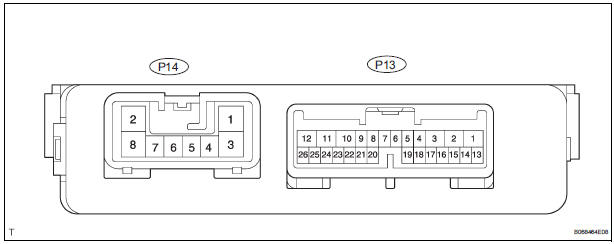
- Disconnect the P13 and P14 ECU connectors, and check the voltage or resistance of each terminal of the wire harness side connectors
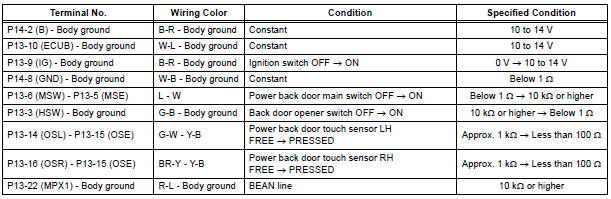
If the result is not as specified, there may be a malfunction on the wire harness side.
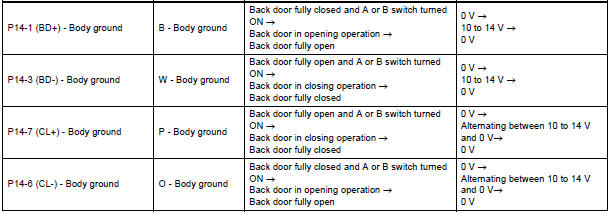
- Reconnect the ECU connectors, and check the voltage of each terminal of the connectors.
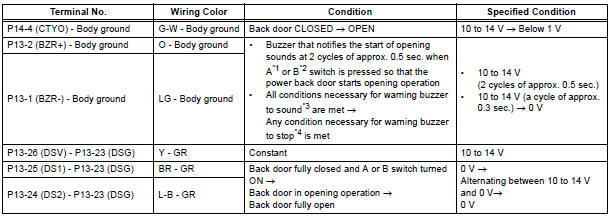
*1 Satellite switch (Back door)
*2 Transmitter switch (Back door)
*3 When all the conditions listed below are met, the
warning buzzer sounds.
- Ignition switch is turned ON
- Shift lever is moved into any position except P position
- Back door is open or power back door system is activated to open
*4 When any condition listed below is met, the warning buzzer turns off.
- Shift lever is moved into P position
- Back door is fully closed
HINT: Use an oscilloscope to check the output voltages of the power back door main switch, buzzer and pulse sensor.
If the result is not as specified, the ECU may have a malfunction.
 Problem symptoms table
POWER BACK DOOR SYSTEM
Symptom
Suspected Area
Power back door does not operate when switch* is
pressed (* Switch indicates the satellite switch for
power back door)
...
 Diagnosis system
1. CHECK DLC3
The vehicle's ECU uses ISO 15765-4 for
communication protocol. The terminal arrangement
of the DLC3 complies with SAE J1962 and matches
the ISO 15765-4 format.
NOTICE: ...
Other materials:
Short to B+ in Driver Side Squib 2nd Step Circuit
DTC B1183/22 Short to B+ in Driver Side Squib 2nd Step Circuit
DESCRIPTION
The driver side squib 2nd step circuit consists of the center airbag sensor
assembly, the spiral cable and
the steering pad.
The circuit instructs the SRS to deploy when deployment conditions are met.
DTC B1183/22 ...
Open in Driver Side Squib Circuit
DTC B0101/14 Open in Driver Side Squib Circuit
DESCRIPTION
The driver side squib circuit consists of the center airbag sensor assembly,
the spiral cable and the
steering pad.
The circuit instructs the SRS to deploy when deployment conditions are met.
DTC B0101/14 is recorded when an open ...
Vehicle Speed Sensor Malfunction
DTC P0500 Vehicle Speed Sensor Malfunction
DTC P0503 Vehicle Speed Sensor "A" Intermittent / Erratic /
High
DESCRIPTION
The cruise control system uses the same vehicle speed signal that is sent to the
ECM for the SFI system.
If DTC P0500 is detected, perform the diagnosis using th ...
