
Toyota Sienna 2010-2026 Owners Manual: The Rear Cross Traffic Alert function detection areas
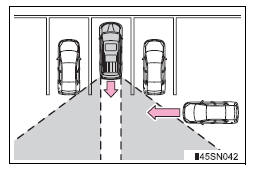
The areas that vehicles can be detected in are outlined below.
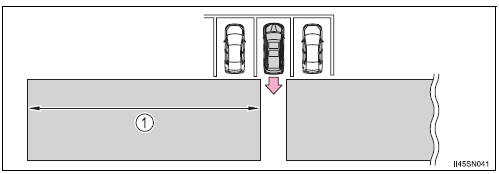
To give the driver a more consistent time to react, the buzzer can alert for faster vehicles from farther away.
Example:
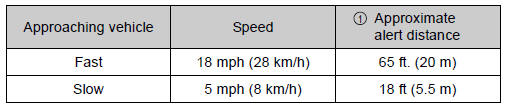
The Rear Cross Traffic Alert function is operational when
- The BSM main switch is set to on.
- The shift lever is in R.
- Vehicle speed is less than approximately 5 mph (8 km/h).
- Approaching vehicle speed is between approximately 5 mph (8 km/h) and 18 mph (28 km/h).
Conditions under which the Rear Cross Traffic Alert function will not detect a vehicle
The Rear Cross Traffic Alert function is not designed to detect the following types of vehicles and/or objects.
- Small motorcycles, bicycles, pedestrians etc.*
- Vehicles approaching from directly behind
- Guardrails, walls, signs, parked vehicles and similar stationary objects*
- Vehicles moving away from your vehicle
- Vehicles approaching from the parking spaces next to your vehicle*
- Vehicles backing up in the parking space next to your vehicle
- Vehicles passing quickly through the detection area
*: Depending on conditions, detection of a vehicle and/or object may occur.
Conditions under which the Rear Cross Traffic Alert function may not function correctly
The Rear Cross Traffic Alert function may not detect vehicles correctly in the following conditions:
- When ice or mud etc. is attached to the rear bumper
- During bad weather such as heavy rain, fog, snow etc.
- When multiple vehicles approach continuously
- Shallow angle parking
- When a vehicle is approaching at high speed
- When parking on a steep incline, such as hills, a dip in the road etc.
- Directly after the BSM main switch is set to on
- When towing a trailer
- Vehicles that the sensors cannot detect because of obstacles
 The Rear Cross Traffic Alert function
The Rear Cross Traffic Alert functions when your vehicle is in reverse.
It can detect other vehicles approaching from the right or left rear of
the vehicle. It uses radar sensors to alert the driv ...
 Driving tips
Winter driving tips
Carry out the necessary preparations and inspections before
driving the vehicle in winter. Always drive the vehicle in a manner
appropriate to the prevailing weather conditions. ...
Other materials:
Installation
1. INSTALL OCCUPANT CLASSIFICATION ECU
Check that the ignition switch is off.
Check that the negative battery (-) terminal is
disconnected.
CAUTION:
After disconnecting the negative battery
terminal, wait for at least 90 seconds before
starting the operation.
&nbs ...
DTC check / clear
1. DTC CHECK (USING SST CHECK WIRE)
Check the DTCs (Present trouble code).
Turn the ignition switch ON, and wait for
approximately 60 seconds.
Using SST, connect terminals TC and CG of the
DLC3.
SST 09843-18040
NOTICE:
Connect the terminals to the correct
p ...
Display settings
Settings are available for adjusting the contrast and brightness
of the screen.
Screen for display settings
Press the “SETUP� button.
Select “Display� on the “Setup� screen.
Adjust screen contrast/brightness
Adjust screen contrast/brightness
of the rear view monitor ...
