
Toyota Sienna 2010-2026 Owners Manual: Canceling and resuming the constant speed control
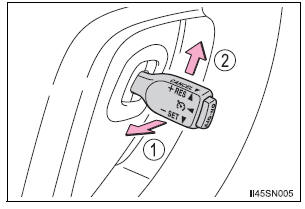
- Pulling the lever toward you
cancels the constant speed
control.
The speed setting is also canceled when the brakes are applied.
- Pushing the lever up resumes
the constant speed control.
Resuming is available when the vehicle speed is more than approximately 25 mph (40 km/h).
Cruise control can be set when
- The shift lever is in D or the range 4, 5 or 6 of S has been selected.
- Vehicle speed is above approximately 25 mph (40 km/h).
Accelerating after setting the vehicle speed
- The vehicle can be accelerated normally. After acceleration, the set speed resumes.
- Even without canceling the cruise control, the set speed can be increased by first accelerating the vehicle to the desired speed and then pushing the lever down to set the new speed.
Automatic cruise control cancelation
Cruise control will stop maintaining the vehicle speed in any of the following situations.
- Actual vehicle speed falls more than approximately 10 mph (16 km/h)
below
the preset vehicle speed.
At this time, the memorized set speed is not retained.
- Actual vehicle speed is below approximately 25 mph (40 km/h).
- VSC is activated.
Operation guide display (vehicles with a multi-information display [with color display])
- When the cruise control switch is operated, a guidance display is shown on the multi-information display for a few seconds as to how to operate the cruise control switch.
- When selecting
 tab on the
multi-information display:
If the warning message for the cruise control is shown on the multiinformation display
Press the “ON-OFF� button once to deactivate the system, and then press the button again to reactivate the system.
If the cruise control speed cannot be set or if the cruise control cancels immediately after being activated, there may be a malfunction in the cruise control system. Have the vehicle inspected by your Toyota dealer.
| WARNING To avoid operating the cruise control by mistake Switch the cruise control off using the “ON-OFF� button when not in use. Situations unsuitable for cruise control Do not use cruise control in any of the following situations. Doing so may result in loss of control and could cause an accident resulting in death or serious injury.
|
 Adjusting the set speed
To change the set speed, operate the lever until the desired set speed
is obtained.
Increases the speed
Decreases the speed
Fine adjustment: Momentarily
move the lever in the desired di ...

Other materials:
Installation
1. Install purge vsv
(A) install the purge vsv with the bolt.
Torque: 10 n*m (102 kgf*cm, 7 ft.*Lbf)
(B) connect the 2 vacuum hoses and no. 1 Vacuum
switching valve connector.
2. INSTALL V-BANK COVER SUB-ASSEMBLY (See
page EM-63)
3. CONNECT CABLE TO NEGATIVE BATTERY
TERMINAL ...
Warning lights
Warning lights inform the driver of malfunctions in the indicated vehicle’s
systems.
*1: These lights turn on when the engine switch is turned to the “ON�
position
(vehicles without a smart key system) or IGNITION ON mode (vehicles
with a smart key system) to indicate that a system c ...
DTC check / clear
HINT:
Illustrations may differ from the actual vehicle depending
on the device settings and options. Therefore, some
detailed areas may not be shown exactly the same as on
the actual vehicle.
If the system cannot enter the diagnostic mode, inspect all AVC-LAN
communication ...
