
Toyota Sienna 2010-2026 Owners Manual: Canceling the power sliding door system (vehicles with power sliding doors)
Turn the main switch off to disable the power sliding door system.
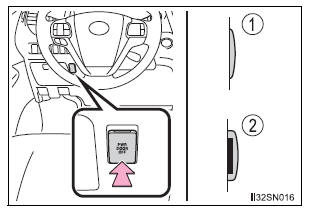
- Off
The sliding doors can only be opened and closed manually. - On*
The power sliding door can be opened and closed with the power sliding door switches for the front occupants or wireless remote control even if the sliding door childprotectors are locked.
*: Orange mark on the switch should be visible when the switch is on.
Locking the sliding doors from the outside without the wireless remote control
- Move the inside lock knob to the lock position.
- Close the sliding door
 Opening/closing the sliding door
Sliding door handle
Open/close
Vehicles with power sliding
doors: The sliding door will be
automatically and completely
opened and closed by the following.
Pulling the outside handle.
S ...
 Sliding door child-protector locks
The sliding door cannot be
opened by the inside door handle
and the second seat sliding door
switch when the lock is set.
Unlock
Lock
These locks can be set to prevent
children from o ...
Other materials:
ABS Warning Light does not Come ON
WIRING DIAGRAM
Refer to ABS Warning Light Remains ON (See page BC-141).
INSPECTION PROCEDURE
1 CHECK ABS WARNING LIGHT
(a) Disconnect the skid control ECU connector.
(b) Turn the ignition switch to the ON position.
(c) Check that the ABS warning light comes on.
OK:
ABS warning light come ...
Adjustment procedure
Manual seat
Seat position adjustment lever
Seatback angle adjustment lever
Vertical height adjustment lever (driver’s side only)
Lumbar support adjustment switch (driver’s side only)*
*: If equipped
Power seat
Seat position adjustment switch
Seatback angle a ...
Operation check
NOTICE:
Inspection should be started after conforming that the
items listed in the "CUSTOMIZE PARAMETER" for the
power slide door system have defaulted to the initial
settings.
1. CHECK OPENING OPERATION
Conditions necessary for the power slide door to
open:
Power slid ...
