
Toyota Sienna 2010-2026 Owners Manual: Changing the vehicle-to-vehicle distance
Pressing the button changes the vehicle-to-vehicle distance as follows:
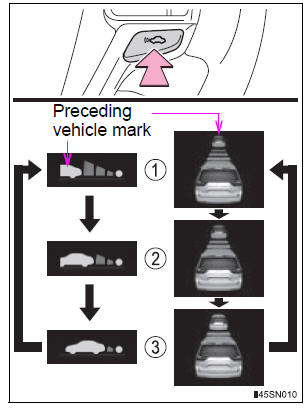
- Long
- Medium
- Short
The vehicle-to-vehicle distance is set automatically to long mode when the engine switch is turned to IGNITION ON mode.
If a vehicle is running ahead of you, the preceding vehicle mark will be also displayed.
 Adjusting the set speed
To change the set speed, operate the lever until the desired set speed
is displayed.
Increases the speed
Decreases the speed
Fine adjustment: Momentarily
move the lever in the desired d ...
 Vehicle-to-vehicle distance settings
Select a distance from the table below. Note that the distances shown
correspond to a vehicle speed of 50 mph (80 km/h). Vehicle-to-vehicle
distance increases/decreases in accordance with vehicle sp ...
Other materials:
Problem symptoms table
POWER WINDOW CONTROL SYSTEM (W/ JAM PROTECTION)
Symptom
Suspected Area
AUTO UP/DOWN function does not operate
Power window regulator motor assembly (Driver side)
Wire harness
Power window regulator master switch assembly
Remote ...
Symptom simulation
HINT:
The most difficult case in troubleshooting is when no
problem symptoms occur. In such a case, a thorough
problem analysis must be carried out. A simulation of the
same or similar conditions and environment in which the
problem occurred in the customer's vehicle should be
carried out. No ...
Removal
1. REMOVE FRONT DOOR OPENING TRIM
WEATHERSTRIP LH
2. REMOVE FRONT DOOR OPENING TRIM
WEATHERSTRIP RH
3. REMOVE FRONT PILLAR GARNISH LH
4. REMOVE FRONT PILLAR GARNISH RH
5. REMOVE VISOR ASSEMBLY LH
6. REMOVE VISOR ASSEMBLY RH
7. REMOVE ASSIST GRIP SUB-ASSEMBLY (2)
8. REMOVE VISOR HOLDER (1)
...
