
Toyota Sienna Service Manual: Data list / active test
1. READ DATA LIST
HINT: Using the intelligent tester to read the Data List allows the values or states of switches, sensors, actuators and other items to be read without removing any parts. This non-intrusive inspection can be very useful because intermittent conditions or signals may be discovered before parts or wiring is disturbed. Reading the Data List information early in troubleshooting is one way to save diagnostic time.
- Connect the intelligent tester to the DLC3.
- Turn the ignition switch to the ON position.
- Read the DATA LIST according to the display on the tester.
LASER CRUISE:
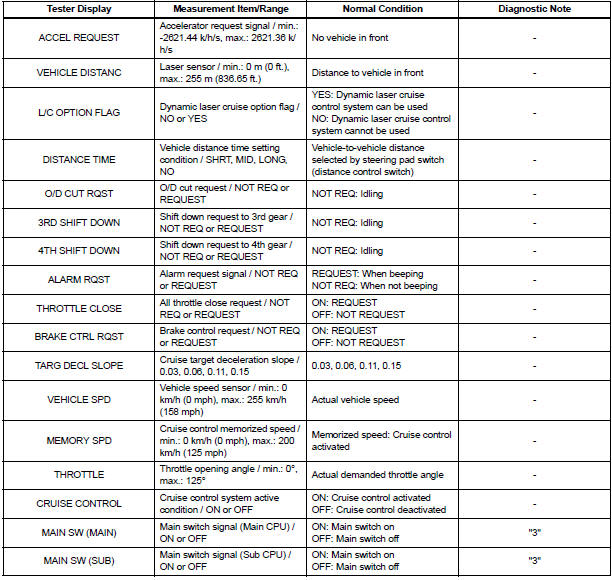
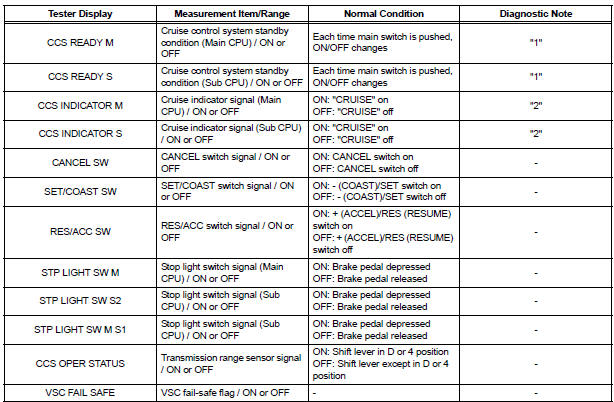
HINT: "3" is OK, but "1" is NG → ECM failure "1" is OK, but "2" is NG → DTC output or ECM failure "3" is OK, but cruise indicator does not turn on → Indicator, wire harness, or ECM failure
2. ACTIVE TEST
HINT: Using the intelligent tester to perform Active Tests allows relays, VSVs, actuators and other items to be operated without removing any parts. This non-intrusive functional inspection can be very useful because intermittent operation may be discovered before parts or wiring is disturbed. Performing Active Tests early in troubleshooting is one way to save diagnostic time. Data List information can be displayed while performing Active Tests.
- Connect the intelligent tester to the DLC3.
- Turn the ignition switch to the ON position.
- According to the display on the tester, perform the "ACTIVE TEST".
HINT: The ignition switch must be turned to the ON position to proceed with the Active Test using an intelligent tester.
ABS/TRAC/VSC:

METER:

 Fail-safe chart
1. AUTO CANCEL FUNCTION (FAIL-SAFE FUNCTION):
HINT:
If a system malfunction occurs, the applicable DTCs will
appear on the multi-information display. In some cases,
a DTC will be set due to we ...
 Diagnostic trouble code chart
If a trouble code is displayed during the DTC check, check
the trouble areas listed for that code in the table below and
proceed to the appropriate page.
Dynamic Laser Cruise Control System:
...
Other materials:
Vehicle Speed Signal Error (Test Mode DTC)
DTC C2191/91 Vehicle Speed Signal Error (Test Mode DTC)
DESCRIPTION
The tire pressure warning ECU receives a speed signal from the combination
meter. This DTC is stored
upon entering test mode, and cleared when a vehicle speed signal of 12 mph (20
km/h) is detected for 3
seconds or more. Thi ...
Yaw rate sensor check (when using intelligent tester)
(a) Check the output of the yaw rate sensor.
(1) Move the shift lever to the D position, drive the
vehicle at a speed of approximately 5 km/h (3
mph), and turn the steering wheel either to the
left or right 90° or more until the vehicle makes a
180° turn.
(2) Stop the vehicle and mov ...
Problem symptoms table
WINDOW DEFOGGER SYSTEM
Symptom
Suspected area
w/ Deicer: Front window deicer does not operate.
(indicator light ON)
FR DEF fuse
Front window deicer relay
Front window deicer wire
Wire harness
w/ deicer: Front window deicer ...
