
Toyota Sienna Service Manual: Disassembly
HINT: Overhaul the RH side by the same procedures as these of the LH side.
1. REMOVE REAR WHEEL
2. SEPARATE REAR DISC BRAKE CALIPER ASSEMBLY LH
HINT: Do not disconnect the flexible hose from the brake caliper.
3. REMOVE REAR DISC
(a) Release the parking brake, and remove the rear disc.
HINT:
- Align matchmarks on the disc and the axle hub.
- If the disc cannot be removed easily, turn the shoe adjuster until the wheel turns freely.
4. REMOVE PARKING BRAKE SHOE ASSEMBLY LH NO.1
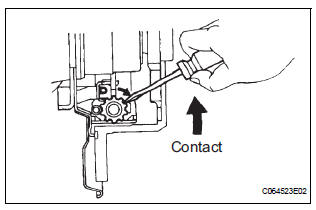
(a) Using needle-nose pliers, remove the 2 shoe return tension springs.
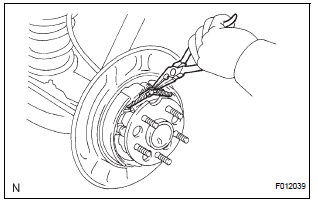
(b) Disconnect the tension spring from the parking brake shoe assembly LH No. 1.
(c) Slide out the parking brake shoe assembly LH No. 1 and remove the parking brake shoe assembly LH No. 1.
(d) Remove the shoe hold-down compression spring, 2 cups and shoe hold-down compression spring pin No. 1.
5. REMOVE PARKING BRAKE SHOE ADJUSTING SCREW SET
6. REMOVE PARKING BRAKE SHOE STRUT LH
7. REMOVE PARKING BRAKE SHOE ASSEMBLY LH NO.2
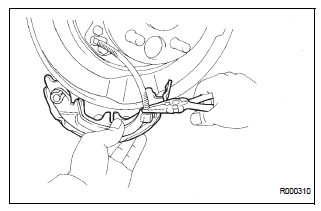
(a) Disconnect the return spring from the parking brake shoe assembly LH No. 2 and remove the tension spring.
(b) Slide out the parking brake shoe assembly LH No.
2.
(c) Remove the shoe hold-down compression spring, 2 cups and shoe hold-down compression spring pin No. 2.
(d) Using needle-nose pliers, disconnect the parking brake cable No. 3 from the parking brake shoe lever and remove the parking brake shoe assembly LH No. 2.
8. REMOVE PARKING BRAKE SHOE LEVER LH
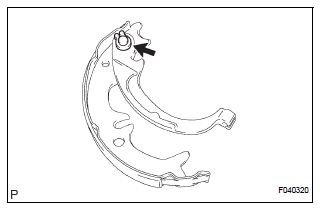
(a) Using a screwdriver, remove the C-washer.
(b) Remove the shim and shoe lever from the parking brake shoe.
 Parking brake assembly
COMPONENTS
...
 Inspection
1. INSPECT BRAKE DISC INSIDE DIAMETER
(a) Using a brake drum gauge or equivalent, measure
the inside diameter of the disc.
Standard inside diameter:
190 mm (7.480 in.)
Maximum inside diameter ...
Other materials:
On-vehicle inspection
1. INSPECT CENTER AIRBAG SENSOR ASSEMBLY
(VEHICLE NOT INVOLVED IN COLLISION)
Perform a diagnosis system check.
2. INSPECT CENTER AIRBAG SENSOR ASSEMBLY
(VEHICLE INVOLVED IN COLLISION AND AIRBAG
HAS NOT DEPLOYED)
Perform a diagnosis system check.
3. INSPECT CENTER AIRBAG ...
SPD Signal Error
DTC 58-43 SPD Signal Error
DTC 80-43 SPD Signal Error
DESCRIPTION
DTC No.
DTC Detection Condition
Trouble Area
58-43
A difference between the GPS speed and SPD pulse is
detected.
Speed signal circuit
Radio and navigation assembly
...
SFR Solenoid Circuit
DESCRIPTION
This solenoid goes on when signals are received from the ECU and controls the
pressure acting on the
wheel cylinders to control the braking force.
WIRING DIAGRAM
INSPECTION PROCEDURE
1 RECONFIRM DTC
HINT:
This code is detected when a problem is determined in the
bra ...
