
Toyota Sienna Service Manual: Disassembly
1. INSPECT OIL PUMP ASSEMBLY
HINT: (See page AX-234)
2. REMOVE CLUTCH DRUM OIL SEAL RING
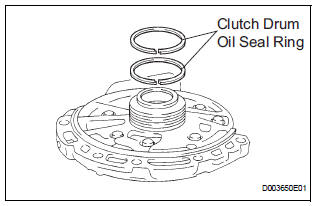
(a) Remove the 2 clutch drum oil seal rings.
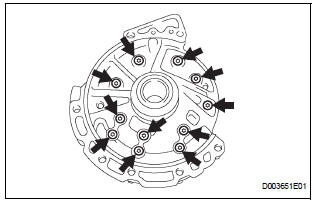
3. REMOVE STATOR SHAFT ASSEMBLY
(a) Using a "torx" socket (T30), remove the 11 bolts and stator shaft.
4. INSPECT CLEARANCE OF OIL PUMP ASSEMBLY
HINT: (See page AX-234)
5. REMOVE FRONT OIL PUMP DRIVE GEAR
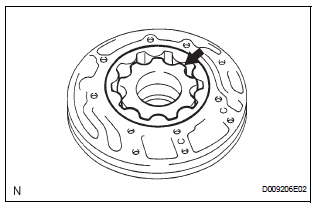
(a) Remove the front oil pump drive gear.
6. REMOVE FRONT OIL PUMP DRIVEN GEAR
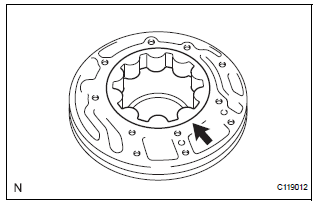
(a) Remove the front oil pump driven gear.
7. REMOVE FRONT OIL PUMP BODY O-RING
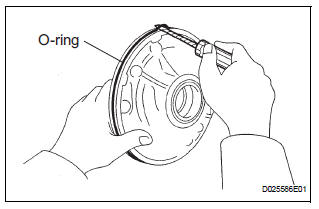
(a) Using a screwdriver, remove the O-ring.
HINT: Tape the screwdriver before use.
8. REMOVE FRONT OIL PUMP OIL SEAL
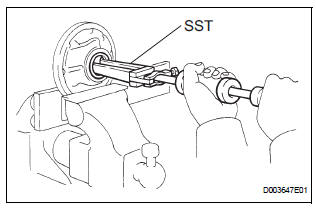
(a) Mount the oil pump in a soft jaw vise.
(b) Using SST, remove the oil seal from the oil pump body.
SST 09308-00010
 Oil pump
COMPONENTS
...
 Inspection
1. INSPECT OIL PUMP ASSEMBLY
(a) Turn the drive gear with the 2 screwdrivers and
make sure that it rotates smoothly.
NOTICE:
Be careful not to damage the oil seal lip.
2. INSPEC ...
Other materials:
Disassembly
1. INSPECT PACK CLEARANCE OF FORWARD
CLUTCH
HINT:
(See page AX-242)
2. REMOVE FORWARD MULTIPLE DISC CLUTCH DISC
(a) Using a screwdriver, remove the snap ring.
(b) Remove the flange, 5 discs and 5 plates from the
input shaft assembly.
3. REMOVE FORWARD CLUTCH RETURN SPRING
SUB-ASSEMB ...
Basic inspection
(a) WHEN MEASURING RESISTANCE OF
ELECTRONIC PARTS
(1) Unless otherwise stated, all resistance
measurements should be made at an ambient
temperature of 20°C (68°F). Resistance
measurements may be inaccurate if measured
at high temperatures, i.e. immediately after the
vehicle has been running ...
Inspection
1. INSPECT OIL PUMP RELIEF VALVE
(a) Coat the relief valve with engine oil and check that it
falls smoothly into the valve hole under its own
weight.
If the valve does not fall smoothly, replace the relief
valve. If necessary, replace the oil pump assembly.
2. INSPECT OIL PUMP ROTOR SET
...
