
Toyota Sienna Service Manual: Disassembly
1. SEPARATE REAR DRIVE SHAFT INBOARD JOINT BOOT CLAMP
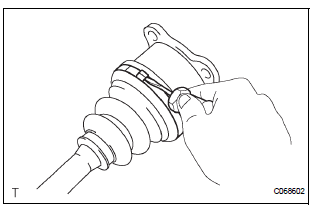
(a) Using a screwdriver, remove the 2 rear drive shaft inboard joint boot clamps as shown in the illustration.
2. SEPARATE REAR DRIVE SHAFT INBOARD JOINT BOOT
(a) Separate the rear drive shaft inboard joint boot from the inboard joint assembly.
3. REMOVE REAR DRIVE SHAFT INBOARD JOINT ASSEMBLY
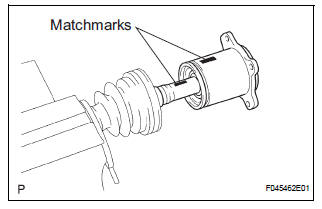
(a) Put matchmarks on the inboard joint assembly and outboard joint shaft.
NOTICE: Do not use a punch for the marks.
(b) Pull out the inboard joint assembly.
NOTICE: Be careful not to drop the balls.
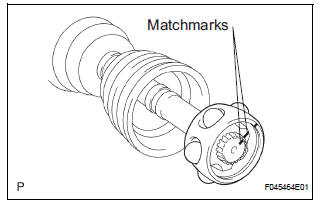
(c) Place matchmarks on the outboard joint shaft, inner race and cage.
NOTICE: Do not punch the marks.
(d) Remove the 6 bolts.
(e) Slide the cage toward outboard joint.
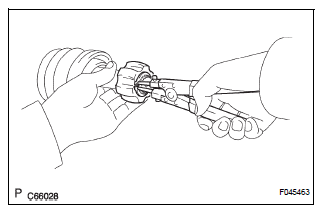
(f) Using a snap ring expander, remove the snap ring.
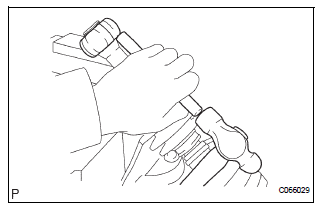
(g) Using a brass bar and hammer, remove the inner race.
(h) Remove the cage.
(i) Remove the inboard joint boot, inboard joint boot clamp and inboard joint boot No. 2 clamp.
4. REMOVE REAR DRIVE SHAFT OUTBOARD JOINT BOOT CLAMP
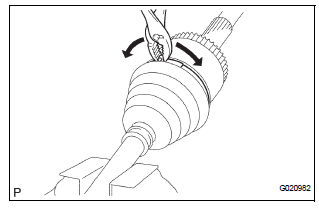
(a) Using pliers, remove the 2 rear drive shaft outboard joint boot clamps as shown in the illustration.
5. REMOVE REAR DRIVE SHAFT OUTBOARD JOINT BOOT
(a) Remove the outboard joint boot from the outboard joint shaft.
(b) Remove the old grease from the outboard joint.
NOTICE: Do not disassemble the outboard joint.
 Removal
1. REMOVE REAR WHEEL
2. REMOVE TAIL EXHAUST PIPE ASSEMBLY (See page
EX-8)
3. SEPARATE REAR SPEED SENSOR
(a) Remove the bolt and the speed sensor from the
axle carrier.
NOTICE:
Be careful not ...
 Inspection
1. INSPECT REAR DRIVE SHAFT ASSEMBLY LH
(a) Check that there is no remarkable play in the radial
direction of the outboard joint.
(b) Check that the inboard joint slides smoothly in the
thru ...
Other materials:
Disassembly
1. REMOVE RH SEAT REAR SEAT RECLINING COVER
Remove the 2 screws.
Remove the RH seat rear seat reclining cover by
pulling it out in the arrow mark direction shown in
the illustration.
2. REMOVE LH SEAT REAR SEAT RECLINING COVER
Remove the 2 screws.
R ...
Installation
1. INSTALL FRONT AXLE ASSEMBLY LH
(a) Install the 2 bolts, nuts and front axle assembly LH
with the 2 bolts and nuts to the shock absorber
assembly front LH.
Torque: 230 N*m (2,350 kgf*cm, 170 ft.*lbf)
NOTICE:
Only when reusing the bolts and nuts, apply
the small amount of engine oil ...
Installation
1. INSTALL FRONT SHOCK ABSORBER WITH COIL SPRING
(a) Install the front shock absorber with coil spring as
shown in the illustration.
(b) Install the 3 nuts to the upper side of the front shock
absorber with coil spring.
Torque: 80 N*m (816 kgf*cm, 59 ft.*lbf)
(c) Install the 2 bolt ...
